
LG 55TR3DQ-B.AUEQ 55" 4K Ultra HD CreateBoard Standard Interactive Display
SKU: 55TR3DQ-B.AUEQ


£894.00 (Excl. VAT)


- Display Size55"
- Touch Capabilities50pt multi-touch
- Net Weight26.7kg
- Operating SystemAndroid 14
- VESA Patterns400x200
- Panel TypeVA Panel
- ResolutionUltra HD (4K)
- Screen TypeFlat
- Response Time6.5ms
- Screen Ratio16:9
- Brightness400 cd/m2
- Operating Hours16/7
- Description
- Specifications
- Downloads
-
4K IPS Panel with 50-Point Multi-Touch Performance
Innovate, Collaborate, and Create with Seamless Interactive Technology, LG CreateBoard

Creative Whiteboard Solution for Interactive Collaboration
LG CreateBoard offers a lifelike touch experience with advanced interactive touchscreen technology, allowing users to interact with content directly on the digital whiteboard. You can write, draw, zoom, and rotate using just your fingers, making it an effective tool for creative projects, digital collaboration, or presentations. Additionally, LG’s interactive whiteboard enables wireless screen sharing, making it an excellent tool for seamless remote collaboration and virtual meetings.
Various Teaching Templates for Interactive Education
LG CreateBoard offers a variety of educational templates and interactive tools such as a ruler, table, and sticky note, fostering active student participation and facilitating intuitive, technology-enhanced lessons through LG’s classroom screens.
Easy to Save, Import, and Export Files
LG CreateBoard incorporates straightforward import and export features for digital content management, making it an ideal digital signage for meeting rooms. Resources can be saved and directly imported to and from cloud storage platforms like Google Drive or OneDrive. After meetings, you can conveniently send emails to share materials or scan a QR code to transfer files to your personal device, enhancing productivity.LG CreateBoard Lab
LG’s proprietary whiteboarding software
Tools for Fluid Discussion
A variety of tools such as a calculator, clock, and sticky note are available to facilitate smooth discussions and ensure seamless idea sharing and communication. Also, users can personalize the menu bar with their most frequently used tools, thereby improving their work efficiency.The following features are included:


Web Browser
When you need a reference during a discussion, you can access various online information in real time with the simple click of a web browser. The necessary information found on the internet can be easily dragged and dropped into the material you’re creating, enhancing the productivity of your meetings.
Multi-OS Support
LG CreateBoard Lab offers multi-OS support, allowing users to utilize it not only with LG CreateBoard but also with other devices. This enables users to maintain a seamless experience on tablets, laptops, and various other devices, even outside the classroom.
LG CreateBoard Share
LG CreateBoard Share offers a wireless screen sharing feature, providing users with a flexible discussion environment. Users can share their screen from their own PC, tablet, or smartphone, simplifying the process of sharing and collaborating on team projects or presentation materials.
Wireless ScreenShare Feature for Seamless Meeting and Collaboration
LG CreateBoard Share establishes a seamless and stable meeting environment with wireless screen sharing technology, eliminating the need for extra cables or connections. Presenters can now share their screens freely without the inconvenience of unplugging and plugging cables each time the presenter changes. With the capability to share up to 9 screens in real-time, it’s possible to display multiple participants’ materials simultaneously when needed, thereby enhancing collaboration efficiency and teamwork productivity.
Simple Connection to LG CreateBoard Share
Users can easily utilize the wireless screen sharing feature via LG CreateBoard Share app, and even without the app, they can still conveniently access this feature through the website. A quick connection to LG CreateBoard Share can be established by entering a 6-digit code.
Presentation Convenience and Flexibility in Meeting Room
Wireless screen sharing empowers presenters to navigate freely within a meeting room, unencumbered by cables. This feature enables them to seamlessly control their presentations directly from their own devices. In addition, they can conveniently send photos and videos stored on their personal devices, enhancing the fluidity and richness of their presentations.
Presentation Convenience and Flexibility in Classroom
In the classroom, the lecturer or presenter doesn’t need to conduct the lesson near the LG CreateBoard, but can flexibly conduct the lesson from anywhere in the classroom. This promotes a more flexible classroom environment and can help keep students more focused.
Secure Mode
LG CreateBoard Share supports Secure Mode, which allows users to grant permissions for sharing. Secure Mode prevents unauthorized users from sharing their screen.
LG ConnectedCare
LG ConnectedCare is a cloud solution for remotely monitoring, controlling, and managing the status of LG CreateBoard and LG signage displays. This feature enables IT managers to operate and manage important resources on operating devices without physically visiting sites.
Dashboard
The LG ConnectedCare dashboard allows you to view and monitor multiple devices at the same time, thereby saving time and boosting efficiency.
Remote-control
The LG ConnectedCare enables centralized and simple control of digital signage connected to the system. Frequently used functions such as power on/off, scheduling and screen brightness adjustment can be applied remotely
Broadcasting
Messages and a range of other content can be sent from the main system to individual devices connected to LG ConnectedCare. Company events or announcements can be broadcasted remotely from the cental system at once.
Alert Message
In case of urgent occasions such as a fire or a natural disaster, alert messages can be distributed manually across the system, which help teachers and students to swiftly perceive the situation and promptly take safety action.Google Certification

Google Certification
LG CreateBoard has received Google certification, enabling users to seamlessly integrate with the Google ecosystem by connecting their Google accounts.
Google Play Store
Users have access to the Google Play Store, where they can download a wide range of applications, including educationrelated games, tools, and more for an expanded experience.Secure Functions

Screen Lock
Users can lock the screen using the Screen Lock function, and unlock it by entering a password. This protective measure can be set up in the Settings menu, safeguarding the device from unauthorized access.
USB Lock Mode
USB Lock Mode is a security measure that helps prevent data from being copied to unauthorized devices, which is essential when being used in spaces where security is critical.
Auto-remove Files
Users can set LG CreateBoard to delete files regularly for enhanced security.Other Features

Multi-touch
LG CreateBoard boasts a multi-touch functionality that can concurrently detect up to 50 touch points. This feature facilitates simultaneous touch and gesture inputs from multiple users, fostering easy collaboration and idea sharing among team members. This enables efficient interaction in group activities or meetings.
C-type Connection
USB-C connectivity simplifies connections which enables charging and sending data simultaneously over just one single cable.
Bluetooth Connectivity for Wireless Device Integration
LG CreateBoard supports wireless Bluetooth connectivity to various external devices such as speakers, mouse, keyboard, and more.
Front Connectivity Design
LG CreateBoard is designed with front display ports, making it easy for users to connect or disconnect cables.
Front Speaker and Subwoofer
LG CreateBoard delivers audio clarity with powerful front-facing speakers and a dedicated subwoofer. LG CreateBoard provides reliable sound quality that supports effective communication and collaboration without the need for additional audio equipment.
Advanced Eye-care
LG CreateBoard has introduced a flicker-free function. With the reduced flickering of the monitor’s backlight, users can use the device with more comfort even when using it for a long time.
Built-in OPS Slot
LG CreateBoard supports OPS slots, allowing users to conveniently mount OPS Module at the back of the screen without the hassle of connecting to an external desktop. This enables various PC functions and Windows software.
Multi-screen Mode
LG CreateBoard supports a multi-screen mode, allowing users to utilize multiple screens simultaneously. Users can take notes, play videos, and browse the web at the same time, thereby enhancing work efficiency. -
Screen Size 55" Panel Technology VA Back Light Type Direct Aspect Ratio 16 : 9 Native Resolution 3,840 X 2,160 (4K UHD) Refresh Rate 60 Hz Brightness 400 nit (Typ.) Contrast Ratio 5,000 : 1 Color Gamut NTSC 72% Viewing Angle (H x V) 178 × 178 Color Depth 10bit(8bit + FRC) Response Time 6.5 ms Surface Treatment (Haze) 25% Lifetime 50,000 Hrs (L50, Min.) Operation Hours (Hours / Days) 16 / 7 Portrait / Landscape No / Yes Bezel Color Black Bezel Width (T / R / L / B) 25.6 / 15 / 15 / 43.5 mm Weight (Head) 26.7 kg Packed Weight 31.6 kg Monitor Dimensions (W × H × D) 1,269 × 783 × 100 mm Carton Dimensions (W × H × D) 1,428 × 185 × 868 mm Handle No VESA™ Standard Mount 400 × 200 mm Protection Glass Safety Glass Glass Thickness 3.2mm Tempered / Strength Tempered strengthening Anti-Reflective Yes Shatter-Proof Yes Internal Memory 64 GB Built-In Wi-Fi Slot Type Auto Brightness Yes Power Indicator Yes Local Key Operation Yes MIC (Built-in) 8 OS / webOS ver. Android14 (EDLA) RS232C Sync LG RS232C Command Multi-screen PIP / PBP (External Source) Screen Share CreateBoard Share Data Cloning Yes Crestron Connected Yes Smart Power Energy Saving, Wake on LAN Network Ready Fast Power On HDMI-CEC Yes webRTC CreateBoard Share Op. Temperature 0 to 40°C Op. Humidity 10% to 90% Power Supply AC 100-240V~, 50/60Hz Power Type Built-In Power Power (Typ.) 135 W Power (Max.) 290 W Energy Saving Yes (70%) DPM 0.5W Power Off 0.5W BTU (Typ.) 461 BTU/Hr BTU (Max.) 990 BTU/Hr Safety CB / NRTL EMC FCC Class "A" / CE / KC ErP / Energy Star Yes / Yes OPS Compatible Yes OPS Power Built In Yes LG ConnectedCare Yes Input HDMI (3), DP, RGB (VGA), Audio, RS-232C, RJ45 (LAN), USB Type-C (2), USB 3.0 Type-A (5), USB 2.0 Type-A Output HDMI Out, Audio Out, Touch USB (3), RJ45 (LAN) Speaker Yes (20 W × 2 + 20 W) Language English, Simplified Chinese, Czech, Denmark, Arabic(Egypt), Finnish, French, German, Greek, Italian, Korean, Netherlands(Dutch), Norwegian, Polski, Portugues(Europe), Portugues(Brazil), Romanian, Russian, Spanish, Swedish, Türkçe, Ukrainian, Traditional Chinese, Hungarian, Thai, Indonesian, Kazakh, Catalan, Basque, Japanese, Estonian, Lithunian Accessory (Basic) Power Cord 3 M*1, USB Cable(Type A-Type B) 5 M*1, USB Type-C Cable(C to C) 1.8 M*1, HDMI Cable 3 M*1, Writing Pen*2pcs, User Manual, QSG, Carton Box, Remote Controller(include battery 2ea), Wifi module Accessory (Optional) Wall Mount (WM-L000S), Floor Stand (ST-000F, ST-860F) Available Object Size Ø2 mm↑ Writing Height ≤2 mm Touch Response ≤5 ms Accuracy ±1 mm Interface USB 2.0 Glass Thickness (AG) 3.2 mm (Anti-Glare) Transmission 88% OS Support Windows 7 / 8 / 10 / Linux / Mac / Android (Supports one point touch on Linux / Mac) Multi Touch Point Max. 50 Points CPU Octa-core A73x4 +A53x4 GPU Mali-G52 MP8 RAM 8 GB Storage 64 GB Wi-Fi 802.11 a/b/g/n/ac/ax (Wi-Fi 6E) LAN Gigabit LAN Bluetooth Bluetooth 5.3 OS ver. Android 14(EDLA) -
Description Downloads Datasheet Download





LATEST CASE STUDIES
See more-
 February 26, 2026
Digital Menu Boards & High-Brightness Display for Karak Chaii, Southall
HOSPITALITY • DIGITAL MENU BOARDS43-inch 4K vivid-bright digital menu board installed by ScreenMoove, ceiling mounted for a clean finish, delivering sharper menu clarity, flexible content updates and reliable 24/7 commercial performance.ClientKarak ChaiiLocationSouthallSectorHospitalityInstallation DateFebruary 2026SolutionDigital Menu BoardsProducts43" Digital Signage Display -
 January 22, 2026
Digital Signage & Installation Service for A MANO, Orpington
RETAIL • Digital SignageWindow-facing 55-inch digital signage installed for A MANO in Orpington, delivering vivid-bright 800 cd/m2 visibility, CMS-controlled updates, and street-level brand impact and daily promotion.ClientA ManoLocationOrpingtonSectorHospitalityInstallation DateJanuary 2026SolutionDigital Signage + InstallationProducts55" Digital Signage Display -
 January 14, 2026
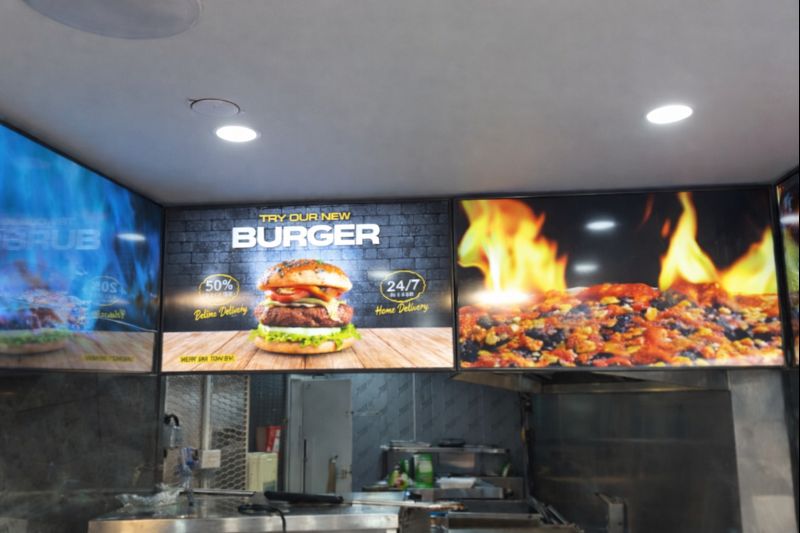
Digital Menu Boards with Custom Curved Mount Installation for Woodys, Andover
HOSPITALITY • DIGITAL MENU BOARDSFour-screen digital menu boards installed for Woodys in Andover, featuring a bespoke curved mounting layout and CMS-controlled content for a bold, immersive menu experience.ClientWoodysLocationAndoverSectorHospitality, QSRInstallation DateFebruary 2025SolutionDigital Menu Boards + CMSProducts43" Digital Menu Boards -
 January 14, 2026
Digital Signage & Freestanding Display for Naan Staap, Leicester
HOSPITALITY • DIGITAL MENU BOARDSMulti-screen digital menu boards and floor-to-ceiling ultra-high-brightness window display installed for Naan Staap in Leicester, delivering clear menus and strong street-level visibility impact.ClientNaan StaapLocationLeicesterSectorHospitality, QSRInstallation DateMay 2025SolutionMenu Boards + UHD DisplayProducts32" Menu Boards & 49" Display


Top Quality Store
Why it matters
Demonstrates consistently strong fulfilment, service, and post-sale experience across Google signals.
Great products and service! The guys always go above and beyond to make sure they supply you with the product that best fits your needs. I’ve been using Screen Moove for a number of years now and woul...
See moreScreen Moove went above and beyond for my requirements. Ordering system was super easy it just take 2 minutes to complete my order and I have received my tracking details right away after few minutes...
See moreMoe Khan, one of the team at Screen Move has been a fantastic help as we have navigated the process of choosing and buying screens and stands for our church. Helpful at every step of the way, patient...
See moreWe originally planned to purchase a cheap TV for our showrooms. After speaking with screen moove, we ended up investing in floorstanding displays across multiple retail sites and showrooms. The bright...
See moreI placed my order late at night but realized I had entered the wrong address. I immediately sent an email asking for it to be changed, not really expecting a reply until the next day. To my surprise,...
See moreI’ve been looking ultra high brightness display despite I checked everywhere I didn’t trust. They got my trust and I ordered. It arrived safely next day we have installed screen is awesome and high qu...
See moreThis is second time I used Screen Moove, I have bought double sided 55 inch display. The first order was a bit delayed I don't blame it might be happen, but customer service over the phone was excell...
See moreScreenmoove, perfect customer satisfaction from start to finish! Their customer service is incredibly helpful and fast. It’s amazing to be able to reach out and get quick solutions for any issue. We a...
See moreWe found that we needed a video call to work out the set up. The tech team at screenmoove were very very good. I would suggest that the instructions that come with the screen offer two key info. 1. Set...
See moreGreat experience with Jonathan Gray, previously I was looking for other companies and randomly ordering our needs from elsewhere. after I met with him, since 2024 we are keep purchasing from screen m...
See moreLooking for a Better Price?
Apply for a Screen Moove trade account and unlock exclusive pricing on commercial displays, digital signage, LED displays, mounting solutions and professional AV products.

Register now
Schedule a Free Consultation
Speak with our team about your display, digital signage, CMS, mounting or installation requirement. We will help you choose the right commercial AV solution before you spend money on the wrong product.
Display Specification Advice
We help you choose the correct screen size, brightness, orientation, operating hours and product type for the real environment.
Mounting & Installation Guidance
Need wall mounting, ceiling mounting, floorstands, video wall brackets or full installation support? We can advise the practical route.
CMS & Content Support
For menu boards, retail signage, reception screens and internal communication displays, we can guide you on CMS setup and content control.
Trade, Education & Multi-Site Projects
For resellers, schools, councils, contractors and multi-site businesses, we support fast quotations, project pricing and rollout planning.



Get in Touch
Ready to start your next AV project?
Contact our team of experts today!