
LG One:Quick Share Wireless Screen Sharing via USB Dongle | SC-00DA
SKU: SC-00DA


£79.00 (Excl. VAT)


- Description
- Specifications
- Downloads
-
Wireless Screen Sharing via USB Dongle

Start Working with Simple and Easy Connecting
LG One:Quick Share is a wireless screen sharing solution available through LG Digital Signage*, USB transmission unit for PC (SC-00DA), and its app. With One:Quick Share, you can simply share personal PC screen to LG Signage with easy initial setup to use, as well as availability to manage LG Signage's basic functions*.
* All images in this web page are for illustrative purposes only and may differ from the actual product.
* LG One:Quick Share is compatible with select LG digital signage models.
* Volume, Picture Mode, Auto Bright, Presentation Timer, Agenda/Note can be set on LG One:Quick Share PC App.
EASY TO START
Easy Pairing
Connect USB type dongle devices to LG Signage for auto pairing, and disconnect them. Just by doing so, these two are ready to be connected each other.
* One signage can be connected to a total of 4 USB-type dongle devices.
EASY TO START
Plug and Play
Simply share your personal PC screen to the LG Signage by connecting the USB dongle device on the PC after pairing with the Signage.
* At the very first time, personal PC needs to install One:Quick Share monitoring software by connecting the dongle device.
SIMPLE TO USE
Wireless Screen Share with Clicks
Through pressing the USB dongle button in different ways, you can simply share the PC screen, change to another's one, and can show up to 4 PC screens on the Signage at the same time.
SIMPLE TO USE
Embedded Wi-Fi
With SoftAP function in LG Signage, USB dongle device and the Signage can be easily connected and used without additional transceiver.
* LG Signage needs to set up Soft AP enabled at Network Menu in Settings App.
VALUE ADDED FEATURES
Setting Without Remote Control
Without a remote control, you can adjust the default setting values of signage (volume, picture mode, auto bright, etc.) on the One:Quick Share PC application, as well as further edit the agenda/note, presentation settings displayed in Office Meeting Mode.
* Setting without remote control function is enabled when the USB Dongle is paired to the LG Signage and connected to the PC.
** Users can enable Office Meeting Mode at EZ Setting menu of the Signage.
VALUE ADDED FEATURES
Screen Manager
Meeting organizer with admin privileges can manage screens shared on the Signage. You can change the order of the split screens, stop screen sharing, or even select the screen among other connected screens. -
Standard Signage (As of October 2021) UH7F / UH7F-H 65” / 55” / 49” UH5F / UH5F-H 98” / 86” / 75” / 65” / 55” / 49” / 43” UM3DG / UM3F / UM3DF 65” / 55” / 49” / 43” UM3DG-H 98” / 86” / 75” UL3G / UL3J 86” / 75” / 65” / 55” / 50” / 43” WP400 / WP401 Supported TV Signage UR640S / UT640S UR640S / UT640S 86” / 75” / 65” / 55” / 50” / 43” STB-6500 Supported LED Signage LAEC015-GN User Switching Yes Split View Yes (Max. 4 Screen) Admin Mode Yes Signage Control Yes Sound Yes Embedded OS Linux CPU Quad-core Cortex™-A7 Internal Memory eMMC (4 GB), DDR3 (512 MB) Wi-Fi IEEE 802.11 a/b/g/n/ac Video H.264 Connectivity USB 2.0 Type A (1) Size (W × H × D) 63.8 × 63.8 × 13.5 mm / USB cable (85.5 mm) Weight 46 g Power Consumption 2.0 W (Typ.), 2.5 W (Max.) Operating Temp / Humidity 0℃ to 40℃ / 0% to 85% OS Support Windows 8.1 64 bit (or Later Version); macOS 10.12 / 10.13 / 10.14 / 10.15 64 bit CPU (Recommended PC) Intel Sandy Bridge i3; Skylake i3 / i5 / i6; AMD Rygen 1st Gen (or Later) Memory (Recommended PC) 8 GB↑ -
Description Downloads Datasheet Download





LATEST CASE STUDIES
See more-
 February 26, 2026
Digital Menu Boards & High-Brightness Display for Karak Chaii, Southall
HOSPITALITY • DIGITAL MENU BOARDS43-inch 4K vivid-bright digital menu board installed by ScreenMoove, ceiling mounted for a clean finish, delivering sharper menu clarity, flexible content updates and reliable 24/7 commercial performance.ClientKarak ChaiiLocationSouthallSectorHospitalityInstallation DateFebruary 2026SolutionDigital Menu BoardsProducts43" Digital Signage Display -
 January 22, 2026
Digital Signage & Installation Service for A MANO, Orpington
RETAIL • Digital SignageWindow-facing 55-inch digital signage installed for A MANO in Orpington, delivering vivid-bright 800 cd/m2 visibility, CMS-controlled updates, and street-level brand impact and daily promotion.ClientA ManoLocationOrpingtonSectorHospitalityInstallation DateJanuary 2026SolutionDigital Signage + InstallationProducts55" Digital Signage Display -
 January 14, 2026
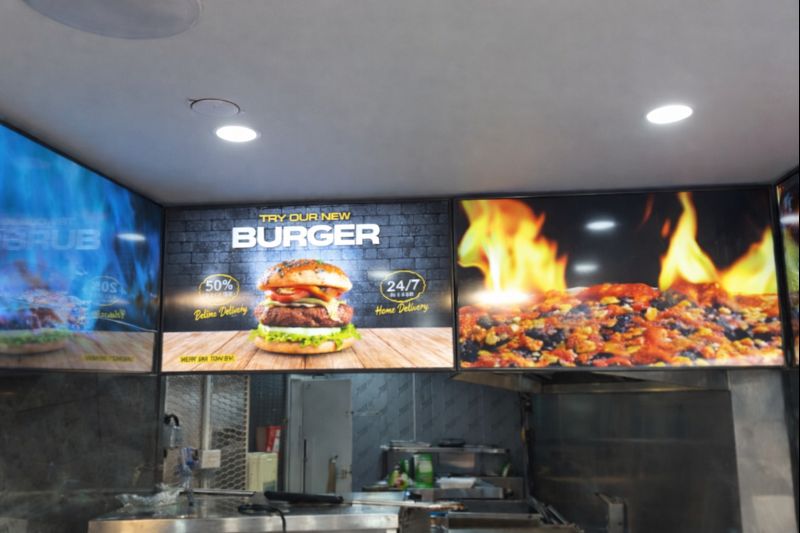
Digital Menu Boards with Custom Curved Mount Installation for Woodys, Andover
HOSPITALITY • DIGITAL MENU BOARDSFour-screen digital menu boards installed for Woodys in Andover, featuring a bespoke curved mounting layout and CMS-controlled content for a bold, immersive menu experience.ClientWoodysLocationAndoverSectorHospitality, QSRInstallation DateFebruary 2025SolutionDigital Menu Boards + CMSProducts43" Digital Menu Boards -
 January 14, 2026
Digital Signage & Freestanding Display for Naan Staap, Leicester
HOSPITALITY • DIGITAL MENU BOARDSMulti-screen digital menu boards and floor-to-ceiling ultra-high-brightness window display installed for Naan Staap in Leicester, delivering clear menus and strong street-level visibility impact.ClientNaan StaapLocationLeicesterSectorHospitality, QSRInstallation DateMay 2025SolutionMenu Boards + UHD DisplayProducts32" Menu Boards & 49" Display


Top Quality Store
Why it matters
Demonstrates consistently strong fulfilment, service, and post-sale experience across Google signals.
Great products and service! The guys always go above and beyond to make sure they supply you with the product that best fits your needs. I’ve been using Screen Moove for a number of years now and woul...
See moreScreen Moove went above and beyond for my requirements. Ordering system was super easy it just take 2 minutes to complete my order and I have received my tracking details right away after few minutes...
See moreMoe Khan, one of the team at Screen Move has been a fantastic help as we have navigated the process of choosing and buying screens and stands for our church. Helpful at every step of the way, patient...
See moreWe originally planned to purchase a cheap TV for our showrooms. After speaking with screen moove, we ended up investing in floorstanding displays across multiple retail sites and showrooms. The bright...
See moreI placed my order late at night but realized I had entered the wrong address. I immediately sent an email asking for it to be changed, not really expecting a reply until the next day. To my surprise,...
See moreI’ve been looking ultra high brightness display despite I checked everywhere I didn’t trust. They got my trust and I ordered. It arrived safely next day we have installed screen is awesome and high qu...
See moreThis is second time I used Screen Moove, I have bought double sided 55 inch display. The first order was a bit delayed I don't blame it might be happen, but customer service over the phone was excell...
See moreScreenmoove, perfect customer satisfaction from start to finish! Their customer service is incredibly helpful and fast. It’s amazing to be able to reach out and get quick solutions for any issue. We a...
See moreWe found that we needed a video call to work out the set up. The tech team at screenmoove were very very good. I would suggest that the instructions that come with the screen offer two key info. 1. Set...
See moreGreat experience with Jonathan Gray, previously I was looking for other companies and randomly ordering our needs from elsewhere. after I met with him, since 2024 we are keep purchasing from screen m...
See moreLooking for a Better Price?
Apply for a Screen Moove trade account and unlock exclusive pricing on commercial displays, digital signage, LED displays, mounting solutions and professional AV products.

Register now
Schedule a Free Consultation
Speak with our team about your display, digital signage, CMS, mounting or installation requirement. We will help you choose the right commercial AV solution before you spend money on the wrong product.
Display Specification Advice
We help you choose the correct screen size, brightness, orientation, operating hours and product type for the real environment.
Mounting & Installation Guidance
Need wall mounting, ceiling mounting, floorstands, video wall brackets or full installation support? We can advise the practical route.
CMS & Content Support
For menu boards, retail signage, reception screens and internal communication displays, we can guide you on CMS setup and content control.
Trade, Education & Multi-Site Projects
For resellers, schools, councils, contractors and multi-site businesses, we support fast quotations, project pricing and rollout planning.



Get in Touch
Ready to start your next AV project?
Contact our team of experts today!