
Apple iPad Pro 512 GB Storage 32.8 cm (12.9") Apple M 8 GB Ram Wi-Fi 6E (802.11ax) iPadOS 16 Grey | MNXU3B/A
SKU: MNXU3B/A


£1,270.75 (Excl. VAT)


- Description
- Specifications
-
Apple iPad Pro 512 GB Storage 32.8 cm (12.9") Apple M 8 GB Ram Wi-Fi 6E (802.11ax) iPadOS 16 Grey

Yes, it does that. And then some.
iPad is so versatile, it’s more than up to any task. Whether you’re working on a project, expressing your creativity, or playing an immersive game, iPad is a fun and powerful way to get it done. Here are just a few of the countless things you can do with iPad.
Run powerful apps effortlessly.
iPad works with the powerful apps you’re familiar with, like Adobe Photoshop or Microsoft Office, with the added ease of using them with touch.
Use multiple apps at once and work between them.
Multitasking with iPad is more intuitive and powerful than ever. Work seamlessly across apps. Use Slide Over or Split View to work with multiple apps at the same time, and even drag and drop content between apps with touch or a trackpad. And on iPad Pro and iPad Air, you can use Stage Manager to overlap, stack, and resize app windows.
Wi‑Fi when you have it. Cellular when you don’t.
Cellular capability means iPad keeps you connected from just about anywhere. So you don’t miss a beat even if you’re away from Wi‑Fi.
Store and share all your stuff with Files.
You can organize, share, and get to all your stuff with the Files app. Manage what’s on your iPad, in iCloud, or on cloud services like Box. Easily access files stored on a thumb drive or other external devices, too.
Take amazing notes with Apple Pencil.
Whether you’re taking class notes, keeping a journal, or brainstorming a solution, iPad is always ready to capture your brightest ideas. Then you can easily share them, build on them, and bring them to life.
Convert your handwritten notes to typed text.
With iPad, your handwriting can be just as powerful as typed text. Start with your handwritten note, then with a few taps, copy and paste it as typed text.
Draw perfect shapes by hand.
Draw familiar shapes freehand with Apple Pencil and watch as shape recognition snaps them into their ideal form.
Sign documents. Mark up anything.
Fill out a form or sign a document right on iPad with your fingertip or Apple Pencil, then send it with just a tap. Or take a screenshot and mark it up, give some retouching notes on a photo, or make revisions to a document.
Handwrite in any text field with Scribble.
Use Apple Pencil to write a quick message or search for something in Safari. Your handwriting will automatically convert to typed text, so you don’t have to interrupt your flow.
Take a Quick Note anywhere.
Quick Note is a fast and easy way to make or get to a note no matter what you’re doing. Start a Quick Note with a swipe of a finger or Apple Pencil, then jot down information over any app or screen. Add links, highlights, tags, and mentions for context.
Draw a masterpiece with Apple Pencil.
With tilt and pressure sensitivity, imperceptible lag, and pixel‑perfect precision, Apple Pencil is the ultimate tool to help turn a blank page into an inspiring work of art.
3D design at your fingertips.
Even the most intensive creative projects are brought to life on iPad. Use touch to move and manipulate objects. Apple Pencil to draw and fine‑tune sketches. You can even view them in AR, all on one device.

Produce music or record a podcast.
Audio apps for iPad help you learn, practice, record, and create with ease. So release an album, start a podcast, or plug in an instrument and jam with your iPad.
Bring your own animated characters to life.
Use Apple Pencil to draw characters and create new worlds with intuitive animation apps designed for all types of artists.
iPad and Mac make a serious creative team.
With Sidecar, you can extend or mirror your Mac display wirelessly. Then use iPad for precision tasks or as an incredible second display. And with Universal Control, a single keyboard and mouse or trackpad work seamlessly between your Mac and iPad.
Comes with 3 months of Apple TV+.
Every iPad includes a 3‑month subscription to Apple TV+, featuring critically acclaimed Apple Original series and films.
Watch and stream all your favorite content.
Catch the newest film and TV releases or rewatch your favorites on an immersive display that goes with you anywhere.
Amazing speakers for music, video, and TV.
Listen to a podcast as you cook, blast your favorite playlist, or take a movie to go.
Catch up on the latest news or read a best seller.
iPad makes reading a joy. Check out all your favorite authors, books, and publications with the Books and News apps.
Shoot a photo or video and edit it right away.
Capture the perfect shot and make it your own with a suite of powerful built‑in or third‑party editing apps. iPad makes editing, enjoying, and sharing your photos and videos easy.
Stay connected.
Use FaceTime and other video conferencing apps to stay connected with family, friends, and the office. You can take selfies, too.
Did you know a document scanner is built right in?
Use the back camera to scan a document, then mark it up and send it. All from the same device.
The best platform for AR.
Advanced cameras, motion tracking, and a large display make iPad the ultimate device for augmented reality. So you can learn, watch, and play in immersive environments.
App Store games that look and play amazing.
Browse and enjoy thousands of games designed just for iPad. From high‑speed racing to jigsaw puzzles, there’s a game for everyone.
Connect a game controller.
Pair your PlayStation or Xbox controller with your iPad to create an incredible portable game console. Play solo or squad up with friends in multiplayer.
Explore a world of games with a free trial of Apple Arcade.
Play your way through hundreds of worlds and experience endless fun with Apple Arcade. One subscription, zero ads, all you can play.
Games are more engaging with motion.
Games take on a new dimension with motion sensors built into iPad. Dodge, drive, and take aim with iPad as an amazing handheld gaming device.
Your classroom can be anywhere.
Take your learning to go and sign in from wherever you are. Attend a lecture, tackle a group project, or simply stay connected with colleagues and classmates from all over.
Learn something new, be it cooking or Cantonese.
iPad makes a perfect companion for learning. Go step by step with an instructor or zip through a self‑guided course in your free time. However you like to learn, there’s an app for that.
A great start for all types of learning.
The App Store has a huge range of educational apps for children to explore outside the classroom. And Screen Time lets you view and set limits on how much time you and your kids spend on apps, websites, and more.
Build your coding skills.
Swift Playgrounds makes it fun to learn and experiment with Swift — a powerful programming language created by Apple. Learn code, build real apps with SwiftUI, and see your ideas come to life on the App Store.
Unlock the world around you with AR.
Expand your mind with augmented reality learning apps. Dive into layers of the human body or point your iPad to the stars and see the constellations above you. -
Feature Details Display Diagonal 32.8 cm (12.9") Display Resolution 2732 x 2048 pixels Display Technology Mini LED Processor Apple M2 CPU Cores 8 RAM 8 GB Storage 512 GB SSD Rear Camera Resolution 12 MP Front Camera Resolution 12 MP Battery Capacity 47.7 Wh Weight 682 g Dimensions (WxDxH) 28.7 cm x 20.9 cm x 0.93 cm Wireless Connectivity Wi-Fi 6E, Bluetooth 5.3 OS Windows 11 Pro Included Accessories Power adapter Security Features TPM 2.0 Security Chip Battery Run Time Up to 15.5 hours




LATEST CASE STUDIES
See more-
 February 26, 2026
Digital Menu Boards & High-Brightness Display for Karak Chaii, Southall
HOSPITALITY • DIGITAL MENU BOARDS43-inch 4K vivid-bright digital menu board installed by ScreenMoove, ceiling mounted for a clean finish, delivering sharper menu clarity, flexible content updates and reliable 24/7 commercial performance.ClientKarak ChaiiLocationSouthallSectorHospitalityInstallation DateFebruary 2026SolutionDigital Menu BoardsProducts43" Digital Signage Display -
 January 22, 2026
Digital Signage & Installation Service for A MANO, Orpington
RETAIL • Digital SignageWindow-facing 55-inch digital signage installed for A MANO in Orpington, delivering vivid-bright 800 cd/m2 visibility, CMS-controlled updates, and street-level brand impact and daily promotion.ClientA ManoLocationOrpingtonSectorHospitalityInstallation DateJanuary 2026SolutionDigital Signage + InstallationProducts55" Digital Signage Display -
 January 14, 2026
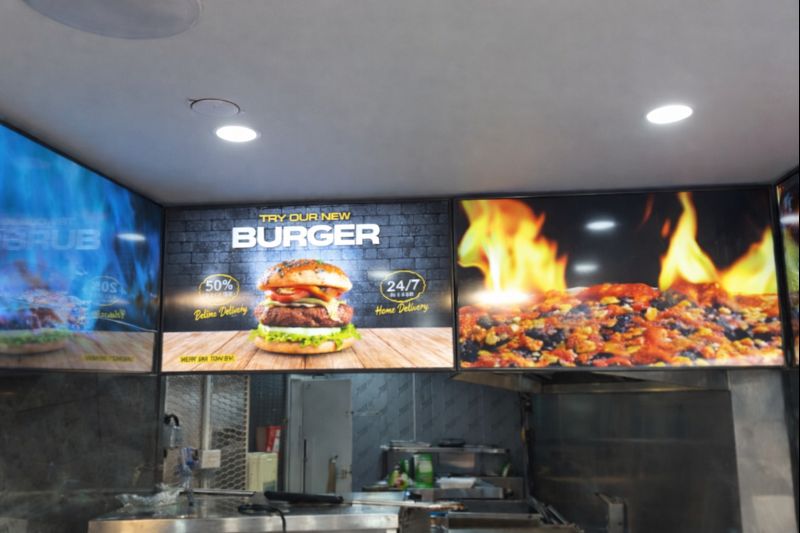
Digital Menu Boards with Custom Curved Mount Installation for Woodys, Andover
HOSPITALITY • DIGITAL MENU BOARDSFour-screen digital menu boards installed for Woodys in Andover, featuring a bespoke curved mounting layout and CMS-controlled content for a bold, immersive menu experience.ClientWoodysLocationAndoverSectorHospitality, QSRInstallation DateFebruary 2025SolutionDigital Menu Boards + CMSProducts43" Digital Menu Boards -
 January 14, 2026
Digital Signage & Freestanding Display for Naan Staap, Leicester
HOSPITALITY • DIGITAL MENU BOARDSMulti-screen digital menu boards and floor-to-ceiling ultra-high-brightness window display installed for Naan Staap in Leicester, delivering clear menus and strong street-level visibility impact.ClientNaan StaapLocationLeicesterSectorHospitality, QSRInstallation DateMay 2025SolutionMenu Boards + UHD DisplayProducts32" Menu Boards & 49" Display


Top Quality Store
Why it matters
Demonstrates consistently strong fulfilment, service, and post-sale experience across Google signals.
Great products and service! The guys always go above and beyond to make sure they supply you with the product that best fits your needs. I’ve been using Screen Moove for a number of years now and woul...
See moreScreen Moove went above and beyond for my requirements. Ordering system was super easy it just take 2 minutes to complete my order and I have received my tracking details right away after few minutes...
See moreMoe Khan, one of the team at Screen Move has been a fantastic help as we have navigated the process of choosing and buying screens and stands for our church. Helpful at every step of the way, patient...
See moreWe originally planned to purchase a cheap TV for our showrooms. After speaking with screen moove, we ended up investing in floorstanding displays across multiple retail sites and showrooms. The bright...
See moreI placed my order late at night but realized I had entered the wrong address. I immediately sent an email asking for it to be changed, not really expecting a reply until the next day. To my surprise,...
See moreI’ve been looking ultra high brightness display despite I checked everywhere I didn’t trust. They got my trust and I ordered. It arrived safely next day we have installed screen is awesome and high qu...
See moreThis is second time I used Screen Moove, I have bought double sided 55 inch display. The first order was a bit delayed I don't blame it might be happen, but customer service over the phone was excell...
See moreScreenmoove, perfect customer satisfaction from start to finish! Their customer service is incredibly helpful and fast. It’s amazing to be able to reach out and get quick solutions for any issue. We a...
See moreWe found that we needed a video call to work out the set up. The tech team at screenmoove were very very good. I would suggest that the instructions that come with the screen offer two key info. 1. Set...
See moreGreat experience with Jonathan Gray, previously I was looking for other companies and randomly ordering our needs from elsewhere. after I met with him, since 2024 we are keep purchasing from screen m...
See moreLooking for a Better Price?
Apply for a Screen Moove trade account and unlock exclusive pricing on commercial displays, digital signage, LED displays, mounting solutions and professional AV products.

Register now
Schedule a Free Consultation
Speak with our team about your display, digital signage, CMS, mounting or installation requirement. We will help you choose the right commercial AV solution before you spend money on the wrong product.
Display Specification Advice
We help you choose the correct screen size, brightness, orientation, operating hours and product type for the real environment.
Mounting & Installation Guidance
Need wall mounting, ceiling mounting, floorstands, video wall brackets or full installation support? We can advise the practical route.
CMS & Content Support
For menu boards, retail signage, reception screens and internal communication displays, we can guide you on CMS setup and content control.
Trade, Education & Multi-Site Projects
For resellers, schools, councils, contractors and multi-site businesses, we support fast quotations, project pricing and rollout planning.




Get in Touch
Ready to start your next AV project?
Contact our team of experts today!