
Synology DiskStation DS425+ Intel® Celeron® J4125 2 GB DDR4 NAS/Storage Server
SKU: DS425+


£526.40 (Excl. VAT)


- Description
- Specifications
- Downloads
-
Synology DiskStation DS425+ | 4-Bay 2.5GbE NAS Server with Intel Celeron J4125 & 2GB DDR4 RAM
2.5GbE connectivity and diverse storage options
The DS425+ features built-in 2.5GbE networking and supports both SATA SSDs and HDDs in 2.5"/3.5" internal bays, as well as M.2 NVMe drives via M.2 slots for use cache.
Store, share, and protect
Manage all your documents, photos, and other files, back up applications and devices, and protect your assets with professional video surveillance.
Private cloud for seamless data Access
Streamlined file management and collaboration
Store, sync, access, and share data from any device, wherever you are. Work seamlessly between different platforms and devices, and access your files through mobile apps, desktop clients, and a browser-based interface. Quickly and easily roll back files in case of accidental deletion, mistakes, malware, etc., with versioning.

A private photo storage and management solution
Effortlessly back up and organize photos, videos, and other visual assets using intuitive management tools. Automatically organize your content into albums and create secure share links for stakeholders and teammates.
Boost team productivity with collaborative tools
Enhance workplace collaboration with Synology's productivity solutions. Create, edit, and share documents across teams in real time. Host an on-premises mail server to provide web-based email access while maintaining full data ownership. Additionally, stay connected through secure one-on-one chats, public channels, encrypted private channels, and group conversations.
Multi-site synchronization to empower global workflows
NAS-to-NAS synchronization
Improve workflow efficiency and team alignment across data sites with automatic one- or two-way site-to-site syncing. Files and folders are kept up-to-date across sites, so everyone stays aligned, whether at home, in the office, or across different branches — all while maintaining full control of your data.

Cloud-powered multi-site syncing
Empower global workflows with high-speed access to data from anywhere in your network. Our hybrid cloud solution caches frequently used files locally for rapid access, while less frequently accessed data is stored in the cloud, reducing your on-site storage requirements.

Sync to public cloud providers
Automatically keep data in sync between Synology NAS and major cloud providers, including BackBlaze B2, Dropbox, Google Drive, and Microsoft OneDrive. Multiple protocol support, client-side encryption, and customizable sync and bandwidth controls enable efficient storage management across various platforms.
Comprehensive data backup, protection, and recovery solutions
Back up PCs, smartphones, cloud apps, and more
Consolidate and automate backup tasks for PCs, file servers, VMs, SaaS applications, and more. Administer device backups remotely through a centralized portal and quickly restore specific files or entire devices to keep your business up and running. Take advantage of built-in backup solutions designed to protect your data with seamless 3-2-1 backup configurations.

Comprehensive and flexible Synology system backups
Protect all data, applications, and configurations on your Synology systems with comprehensive scheduled backups, including bare-metal backups, to local and remote servers, external drives, or cloud storage destinations, including Synology C2 Storage.

Tamper-proof protection with immutable snapshots
Safeguard critical LUNs and shared folders with automated immutable snapshots backed by custom retention policies. Built-in support for offsite replication further ensures robust business continuity.
Smart surveillance
Synology Surveillance Station
Protecting your business has never been easier, with centralized management, support for over 8,700 IP camera models, and remote monitoring and playback. Synology’s scalable video management system provides all the tools you need for live monitoring, investigation, management, and backup.

Dual recording to the cloud
Secure your surveillance footage with robust cloud backup that supports end-to-end encryption. Our cloud-based surveillance backup solution safeguards your Surveillance Station recordings, allowing you to access, view, share, and download footage through a convenient web portal. Ensure your data remains available even if your on-premises system is compromised.
Centralized monitoring and management
Monitor and manage your Synology fleet from a central interface, on-prem or in the cloud
Central Management System
Manage Synology servers from a central console using group policies, task delegation, batch updates, and more.
Active Insight
Monitor your global Synology fleet's performance, backup status, login activity, and more with the power of the cloud.
Supercharge your setup with Synology router
Pair your NAS with Synology RT6600ax or WRX560 to maximize 2.5GbE connectivity. Enjoy high-speed transfers and secure your network with VLANs, threat prevention, and web filtering — all through a familiar Synology interface.
Extended protection with Extended Warranty
The DS425+ is backed by Synology’s 3-year hardware warranty.11 An optional 2-year extended warranty is available in select regions to extend coverage to 5 years.
Hardware Overview
1. Status indicator
2. Drive status indicators
3. Drive tray lock
4. USB 3.2 Gen 1 port
5. Power button and indicator
6. Drive trays
7. Fans
8. 1GbE RJ-45 port
9. 2.5GbE RJ-45 port
10. Reset button
11. USB 3.2 Gen 1 port
12. Power port
13. Kensington security slot
14. M.2 NVMe SSD slots -
Feature Description CPU Model Intel Celeron J4125 CPU Quantity 1 CPU Cores 4 CPU Architecture 64-bit CPU Frequency 2.0 GHz (base) / 2.7 GHz (turbo) Hardware Encryption Engine Yes System Memory 2 GB DDR4 non-ECC Total Memory Slots 1 Maximum Memory Capacity 6 GB (2 GB + 4 GB) Memory Notes Synology may replace memory modules with same or higher frequency depending on supply life cycle; compatibility and stability are verified to ensure identical performance.
For optimal compatibility and reliability, use Synology memory modules. Warranty/support may be limited if non-Synology memory is used.Drive Bays 4 M.2 Drive Slots 2 (NVMe) Supported Drive Types 3.5" SATA HDD; 2.5" SATA SSD; M.2 2280 NVMe SSD Hot Swappable Drive* Yes (not supported on M.2 SSD slots) Storage Notes Compatible drives are mandatory; consult the compatibility list before purchasing drives.
The hot swappable drive feature does not apply to M.2 SSD slots.RJ-45 1GbE LAN Port 1 (MTU up to 1,500 bytes) RJ-45 2.5GbE LAN Port 1 USB 3.2 Gen 1 Ports 2 Dimensions (H × W × D) 166 mm × 199 mm × 223 mm Weight 2.18 kg System Fan 92 mm × 92 mm × 2 pcs Fan Speed Modes Full-Speed, Cool, Quiet Front LED Brightness Adjustable Power Recovery Supported Noise Level* 21.6 dB(A) Scheduled Power On/Off Supported Wake on LAN / WAN Supported Power Adapter 90 W AC Input 100–240 V AC, 50/60 Hz, Single Phase Power Consumption* 28.25 W (Access); 6.10 W (HDD Hibernation) BTU 96.33 BTU/hr (Access); 20.79 BTU/hr (HDD Hibernation) Measurement Notes Power consumption measured per Synology methodology.
Noise tested with Synology SATA SSDs, idle state; microphones at 1 m front/rear; background 16.49–17.51 dB(A); 24.25–25.75 °C; 58.2–61.8% RH.Operating Temperature 0 °C to 40 °C (32 °F to 104 °F) Storage Temperature -20 °C to 60 °C (-5 °F to 140 °F) Operating Humidity 8% to 80% RH Storage Humidity 5% to 95% RH Certifications FCC, CE, BSMI, VCCI, RCM, UKCA, EAC, CCC, KC, BIS Hardware Warranty 3 years (extendable to 5 years with EW201 or Extended Warranty Plus) Warranty Notes Warranty period starts from purchase date on receipt.
Extended Warranty Plus availability: Europe & North America; EW201/EW202: Asia, Africa, Oceania.Environmental Compliance RoHS Compliant Packaging Content Main Unit ×1; Accessory Pack ×1; AC Power Adapter ×1; AC Power Cord ×1; RJ-45 LAN Cable ×2 Optional Accessories DDR4 non-ECC SODIMM: D4NS01-4G
Enterprise 3.5" SATA HDD: HAT5300 Series
Plus 3.5" SATA HDD: HAT3300 Series
Enterprise 2.5" SATA SSD: SAT5200 Series
Enterprise M.2 2280 NVMe SSD: SNV3400 & SNV5400 SeriesMax Single Volume Size 108 TB Max Internal Volumes 32 M.2 SSD Storage Pool Supported* SSD Cache SSD Read/Write Cache supported SSD TRIM Supported Supported RAID Types Synology Hybrid RAID, Basic, JBOD, RAID 0/1/5/6/10 RAID Migration Basic→RAID 1; Basic→RAID 5; RAID 1→RAID 5; RAID 5→RAID 6 Volume Expansion (Larger HDDs) SHR, RAID 1/5/6/10 Volume Expansion (Add HDD) SHR, JBOD, RAID 5 Global Hot Spare (RAID) SHR, RAID 1, RAID 5 Storage Notes Each internal volume expandable up to 108 TB.
Actual max pool/volume sizes depend on drive sizes, bays, and RAID.
Usable capacity is lower due to filesystem and metadata.
M.2 storage pools require Synology-verified SSDs; thermal parameters tuned for I/O-intensive environments.Internal File Systems Btrfs, ext4 External File Systems Btrfs, ext4, ext3, FAT32, NTFS, HFS+, exFAT Protocols SMB, AFP, NFS, FTP, WebDAV, Rsync Max SMB Connections 10 (FSCT-based) Windows ACL Integration supported NFS Kerberos Authentication supported File Services Notes Tested with Synology SATA HDDs fully populated and all onboard NICs.
Models with expandable memory tested at max capacity.
SMB performance evaluated with FSCT 1.3 (HomeFolder workload, 600 s) using Windows Server 2022 DC, 8× Windows 10 clients, directory leasing enabled.Max Local Users 512 Max Local Groups 128 Max Shared Folders 128 Max Shared Folder Sync Tasks 4 Max Hybrid Share Folders 10 Hyper Backup Folder/Package backup; entire system backup High Availability Synology High Availability supported Syslog Events/sec 800 VMware vSphere ESXi 6.5–8.0 U2 (various U releases) Microsoft Hyper-V Windows Server 2022 Citrix XenServer 8; Citrix Hypervisor 8.2 LTSR CU1 OpenStack Cinder Supported Protocols SMB1/2/3, NFSv3/v4/v4.1, NFS Kerberized, iSCSI, HTTP/HTTPS, FTP, SNMP, LDAP, CalDAV Supported Browsers Chrome, Firefox, Edge, Safari Supported Languages English, Deutsch, Français, Italiano, Español, Dansk, Norsk, Svenska, Nederlands, Русский, Polski, Magyar, Português (BR/EU), Türkçe, Český, ไทย, 日本語, 한국어, 繁體中文, 简体中文 Central Management System Supported Synology AI Console Third-party AI model integration supported Synology Chat Users Up to 100 (measured with simulated users) Download Station Tasks Maximum 80 concurrent Max iSCSI Targets / LUNs Targets: 2; LUNs: 4 (LUN clone/snapshot, Windows ODX supported) MailPlus Accounts 5 free (more via licenses) MailPlus Users (Suggested) Up to 20 (with specified workload and features enabled) DLNA Compliance Media Server compliant Synology Photos Facial recognition; object recognition (requires ≥4 GB RAM) Max Snapshots / Folder 128 Max System Snapshots 1,024 Default Camera Licenses 2 (additional licenses required for more cameras) Max IP Cameras / FPS (H.264) 1080p: 40 ch / 800 FPS; 3M: 35 ch / 350 FPS; 5M: 28 ch / 280 FPS; 4K: 17 ch / 170 FPS Max IP Cameras / FPS (H.265) 1080p: 40 ch / 1200 FPS; 3M: 40 ch / 600 FPS; 5M: 40 ch / 480 FPS; 4K: 20 ch / 200 FPS Surveillance Notes Figures based on fully populated device, default memory, continuous recording.
Capabilities vary by configuration, drive performance, enabled features, and workloads.
Viewer channels can be up to 2× the max cameras for same codec/resolution.Synology Drive Users Up to 20 (suggested) Max Hosted Files 500,000 (indexed/hosted by Drive) Synology Office Users Up to 20 (suggested; client performance dependent) Virtual Machine Manager Recommended VMs: 2; Recommended Virtual DSM: 2 (incl. 1 free license) VPN Server Connections Maximum 4 -
Description Downloads Synology DiskStation DS425+ Intel® Celeron® J4125 2 GB DDR4 NAS/Storage Server DataSheet Download





LATEST CASE STUDIES
See more-
 February 26, 2026
Digital Menu Boards & High-Brightness Display for Karak Chaii, Southall
HOSPITALITY • DIGITAL MENU BOARDS43-inch 4K vivid-bright digital menu board installed by ScreenMoove, ceiling mounted for a clean finish, delivering sharper menu clarity, flexible content updates and reliable 24/7 commercial performance.ClientKarak ChaiiLocationSouthallSectorHospitalityInstallation DateFebruary 2026SolutionDigital Menu BoardsProducts43" Digital Signage Display -
 January 22, 2026
Digital Signage & Installation Service for A MANO, Orpington
RETAIL • Digital SignageWindow-facing 55-inch digital signage installed for A MANO in Orpington, delivering vivid-bright 800 cd/m2 visibility, CMS-controlled updates, and street-level brand impact and daily promotion.ClientA ManoLocationOrpingtonSectorHospitalityInstallation DateJanuary 2026SolutionDigital Signage + InstallationProducts55" Digital Signage Display -
 January 14, 2026
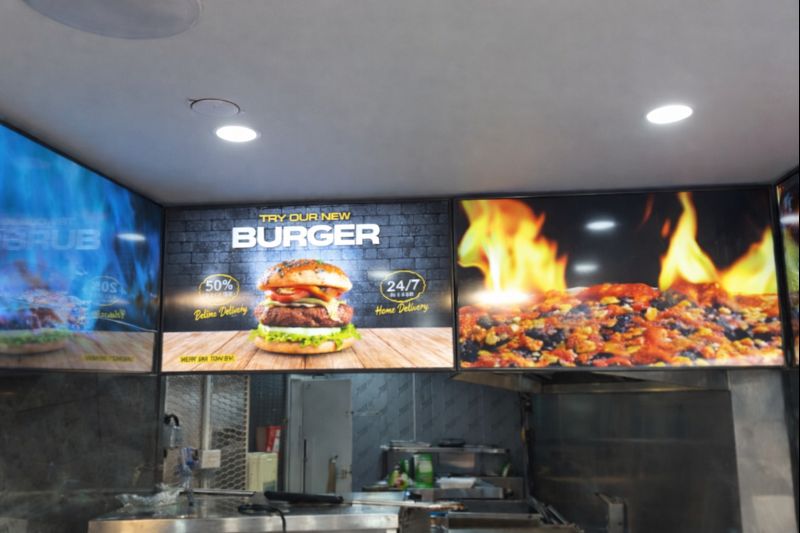
Digital Menu Boards with Custom Curved Mount Installation for Woodys, Andover
HOSPITALITY • DIGITAL MENU BOARDSFour-screen digital menu boards installed for Woodys in Andover, featuring a bespoke curved mounting layout and CMS-controlled content for a bold, immersive menu experience.ClientWoodysLocationAndoverSectorHospitality, QSRInstallation DateFebruary 2025SolutionDigital Menu Boards + CMSProducts43" Digital Menu Boards -
 January 14, 2026
Digital Signage & Freestanding Display for Naan Staap, Leicester
HOSPITALITY • DIGITAL MENU BOARDSMulti-screen digital menu boards and floor-to-ceiling ultra-high-brightness window display installed for Naan Staap in Leicester, delivering clear menus and strong street-level visibility impact.ClientNaan StaapLocationLeicesterSectorHospitality, QSRInstallation DateMay 2025SolutionMenu Boards + UHD DisplayProducts32" Menu Boards & 49" Display


Top Quality Store
Why it matters
Demonstrates consistently strong fulfilment, service, and post-sale experience across Google signals.
Great products and service! The guys always go above and beyond to make sure they supply you with the product that best fits your needs. I’ve been using Screen Moove for a number of years now and woul...
See moreScreen Moove went above and beyond for my requirements. Ordering system was super easy it just take 2 minutes to complete my order and I have received my tracking details right away after few minutes...
See moreMoe Khan, one of the team at Screen Move has been a fantastic help as we have navigated the process of choosing and buying screens and stands for our church. Helpful at every step of the way, patient...
See moreWe originally planned to purchase a cheap TV for our showrooms. After speaking with screen moove, we ended up investing in floorstanding displays across multiple retail sites and showrooms. The bright...
See moreI placed my order late at night but realized I had entered the wrong address. I immediately sent an email asking for it to be changed, not really expecting a reply until the next day. To my surprise,...
See moreI’ve been looking ultra high brightness display despite I checked everywhere I didn’t trust. They got my trust and I ordered. It arrived safely next day we have installed screen is awesome and high qu...
See moreThis is second time I used Screen Moove, I have bought double sided 55 inch display. The first order was a bit delayed I don't blame it might be happen, but customer service over the phone was excell...
See moreScreenmoove, perfect customer satisfaction from start to finish! Their customer service is incredibly helpful and fast. It’s amazing to be able to reach out and get quick solutions for any issue. We a...
See moreWe found that we needed a video call to work out the set up. The tech team at screenmoove were very very good. I would suggest that the instructions that come with the screen offer two key info. 1. Set...
See moreGreat experience with Jonathan Gray, previously I was looking for other companies and randomly ordering our needs from elsewhere. after I met with him, since 2024 we are keep purchasing from screen m...
See moreLooking for a Better Price?
Apply for a Screen Moove trade account and unlock exclusive pricing on commercial displays, digital signage, LED displays, mounting solutions and professional AV products.

Register now
Schedule a Free Consultation
Speak with our team about your display, digital signage, CMS, mounting or installation requirement. We will help you choose the right commercial AV solution before you spend money on the wrong product.
Display Specification Advice
We help you choose the correct screen size, brightness, orientation, operating hours and product type for the real environment.
Mounting & Installation Guidance
Need wall mounting, ceiling mounting, floorstands, video wall brackets or full installation support? We can advise the practical route.
CMS & Content Support
For menu boards, retail signage, reception screens and internal communication displays, we can guide you on CMS setup and content control.
Trade, Education & Multi-Site Projects
For resellers, schools, councils, contractors and multi-site businesses, we support fast quotations, project pricing and rollout planning.



Get in Touch
Ready to start your next AV project?
Contact our team of experts today!