




Cloud-Based Digital Signage CMS
ScreenMoove CMS for Professional Digital Signage Networks
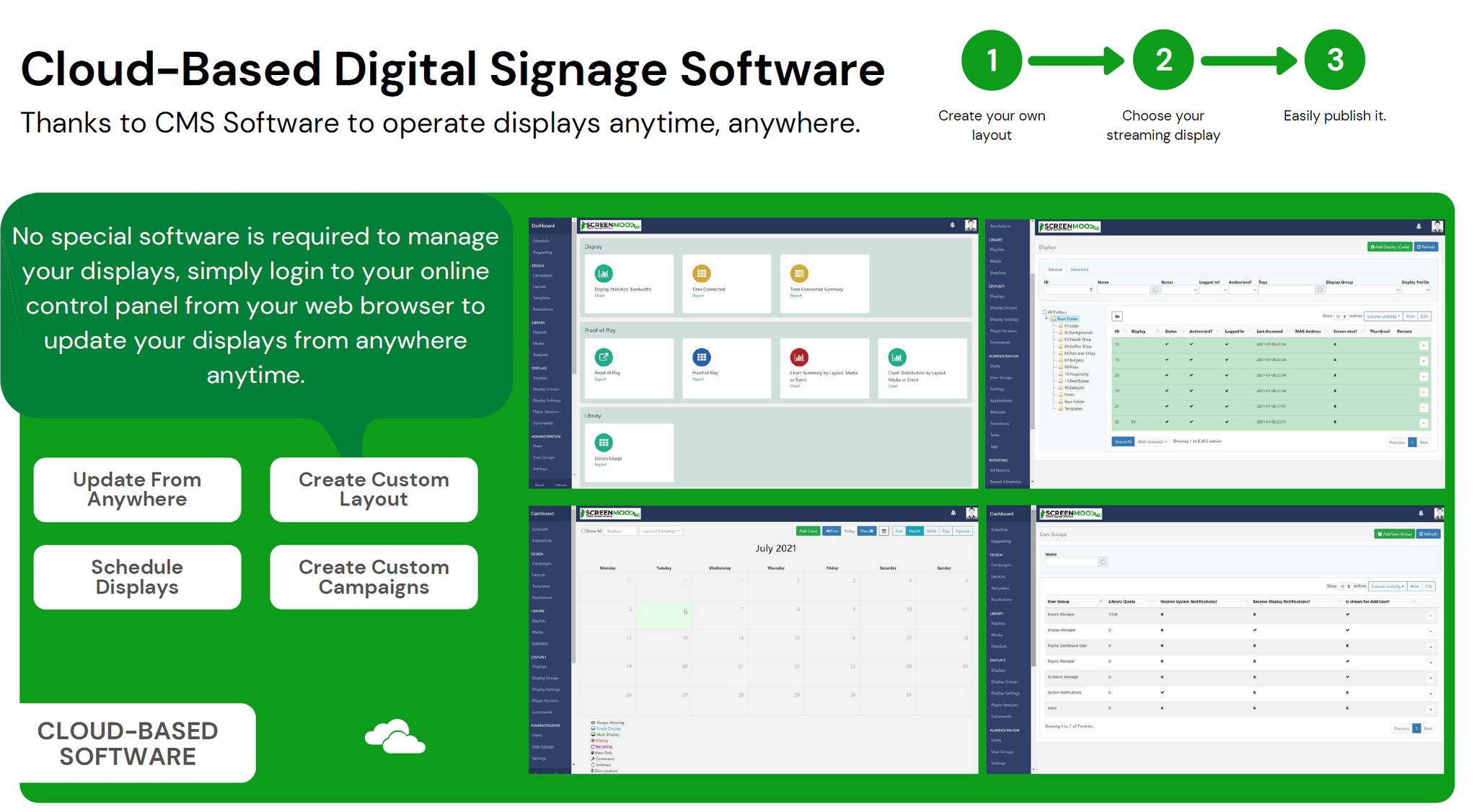
Manage, schedule and publish content across your digital signage displays from one central cloud-based CMS.
Built for restaurants, retail, education, healthcare, corporate spaces and multi-site operations, ScreenMoove CMS gives you structured control over content, layouts, campaigns and screen communication.
- Compatible with Android, Windows, Ubuntu and LG webOS
- Central cloud hosting and screen management
- Scheduling, proof of play, layouts and dashboards
- Commercial support options from Professional to Enterprise
Platform Compatibility
 Android
 Windows
 Ubuntu
 LG webOS
Digital Signage Software Built for Business Use
ScreenMoove CMS is designed for customers who need a practical, scalable and commercially structured signage platform rather than a basic media player. It supports day-to-day content management, multi-location rollouts and customer-facing digital communication.
From digital menu boards and in-store promotions to waiting room screens, internal communications and education announcements, the platform gives your business stronger control over what plays, where it plays and when it goes live.
Whether you are deploying one screen or managing a wider digital signage estate, ScreenMoove CMS gives you layout tools, hosting, support options and commercial flexibility to keep your network organised.
- Central CMS access, manage displays remotely from one web-based platform.
- Flexible layouts, publish menus, videos, notices, promotions, dashboards and branded content.
- Scalable plans, suitable for startups, growing businesses and enterprise networks.
- Commercial support structure, from standard help desk to high-priority enterprise support.
Key CMS Features
ScreenMoove CMS combines cloud management, signage publishing tools and support options into one structured service for commercial display projects.
Open Source Foundation
A fully functional digital signage CMS built on a proven open-source framework, giving your deployment flexibility and long-term practicality.
Cost Effective
Structured pricing plans for different business stages, from entry-level deployments through to advanced enterprise support requirements.
Cloud Hosting
Cloud hosting is included so your team can focus on content publishing and network management rather than infrastructure.
Excellent Support
Community access, help desk support, priority support and high-priority support options depending on the plan selected.
Safe & Secure
Commercial CMS hosting with secure management, retention policies and stronger control over your signage environment.
Web CMS
Create, upload, schedule and control display content from your browser, whether on desktop or tablet.
DooH Advertising
Run advertising slots and scheduled campaigns more effectively with tools built around digital signage publishing.
Layout Editor
Create digital signage layouts for menus, notices, visual promotions and multi-zone screen content.
Headless CMS
Use the API suite and connected tools to build your own user experience and custom signage workflows.
Your content your way
Easily navigate and create your content
ScreenMoove makes creating and managing your digital signage content quick, practical and easy for day-to-day business use.
Design
Create layouts for all your content ideas using powerful built-in widgets, media zones and integrated content options to keep your displays fresh, relevant and up to date.
Preview
Bring your design to life in the browser and see how it will look on screen before publishing. Play it through from start to finish to get the full picture.
Schedule
Scheduling your content is straightforward with ScreenMoove. Use one-off events, repeat schedules, always-on content and campaign-based scheduling to stay in full control.

Faster Updates
Change campaigns, prices, menus, notices and live messaging without reprinting static materials or manually changing each display.
Better Communication
Use screens for stronger customer messaging, internal communication, promotional activity and site-wide consistency.
Commercially Scalable
Choose a plan that suits your current rollout and move up as your requirements grow, from standard hosting to enterprise support.
CMS Monthly Plans
Choose the support and service level that fits your digital signage rollout, from standard hosted CMS access to enterprise-grade support and retention options.
Plans
Professional
Ideal for businesses just starting their digital signage journey, includes cloud hosting and help desk support.
£3.50
per display monthly
- Any player†, open source or commercial licences
- Version upgrades
- Cloud hosting included
- Help desk support
Business
Best for businesses with enhanced digital signage needs such as Priority support with SLA.
£5.50
per display monthly
Everything in Professional plus:
- 6GB bandwidth
- Priority help desk support
- SAML support
- 5 concurrent dashboards*
Enterprise
For large businesses looking for priority support with the highest SLA and highest logging retention policies.
£9.00
per display monthly
Everything in Business plus:
- 8GB bandwidth
- High priority help desk
- 15 concurrent dashboards*
- Extended proof of play and audit log retention
Plan Comparison
A clear breakdown of what is included across Professional, Business and Enterprise CMS plans.
| Feature | Professional | Business | Enterprise |
|---|---|---|---|
| CMS | |||
| Cloud Storage | 1GB Storage | 1.5GB Storage | 2GB Storage |
| Cloud Bandwidth | 4GB Bandwidth | 6GB Bandwidth | 8GB Bandwidth |
| Proof of Play retention period | 62 days | 62 days | 124 days |
| Audit logging retention period | 1 month | 3 months | 1 year |
| Single sign on via SAML | |||
| Cloud Vanity Domain | |||
| Weather Data | |||
| Currency and Stocks Data | |||
| Dashboard Connector (per plan) | Add-on | 5 concurrent | 15 concurrent |
| Multi Screen Sync | |||
| Players | |||
| Any player | |||
| Any version | |||
| Perpetual licensing (additional cost) | Available on request | Available on request | Available on request |
| Edit Text | |||
| Support | |||
| Community support | |||
| Help desk support | Best Effort | Priority | High Priority |
| Help desk SLA | No | 5 working days | 3 working days |
| Help desk support for perpetual player licences | |||
| Account Manager | |||
| Financial | |||
| Payment via PayPal / Credit or Debit Card | |||
| Payment via Purchase Order | |||
| Custom payment terms / agreements | |||
FAQs
Got questions about ScreenMoove CMS? Here are some of the most common questions. If you still cannot find what you are looking for, contact our team for guidance.
What is the ScreenMoove CMS?
The ScreenMoove CMS is the central platform where your digital signage network is managed. It is where you create layouts, upload media, schedule content to players and manage deployment settings. It is cloud-hosted and accessed through a web browser.
How do ScreenMoove players communicate with the CMS?
ScreenMoove players are designed to communicate with the CMS over standard web connections, typically using HTTP or HTTPS. This allows the player to check for content updates, schedules, proof of play data and other deployment instructions.
What is a layout?
A layout is the screen design that gets scheduled to your digital signage players. It controls how your media, text, widgets, images, videos and other content appear on screen.
What types of content does ScreenMoove CMS support?
ScreenMoove CMS supports a wide range of file-based media and web-based content. This can include images, videos, text, notices, widgets, dashboards and other connected content, provided the player and hardware being used are capable of supporting it properly.
Can I manage multiple screens from one CMS?
Yes. ScreenMoove CMS is built to manage single-screen setups as well as larger multi-screen and multi-site digital signage networks from one central interface.
Is ScreenMoove CMS suitable for menu boards and retail promotions?
Yes. It is well suited for restaurant menu boards, takeaway screens, window displays, retail promotions, internal communication screens, education notices and other customer-facing or operational signage requirements.
Schedule a Free Consultation
Speak with our team about the right ScreenMoove CMS plan, compatible hardware, support level and rollout structure for your digital signage project.
CMS Plan Guidance
We help you choose between Professional, Business and Enterprise based on support requirements, bandwidth, dashboard usage and retention needs.
Hardware Compatibility Advice
Need help selecting a compatible Android, Windows, Ubuntu or LG webOS setup, we can guide you on the practical route for your signage deployment.
Multi-Site Rollout Support
For customers with multiple screens, branches or customer-facing advertising requirements, we can advise on scale, support tier and screen strategy.
Commercial Project Discussion
Whether you need menu boards, retail signage, public information screens or internal communication displays, we can help define the right CMS package.