Book a Free Product Demonstration
Compare picture quality, touchscreen performance, software and connectivity with guidance from a commercial display specialist.
LG 75TR3DK 75” 4K UHD Infrared Create Board Interactive Touchscreen

Various Teaching Templates
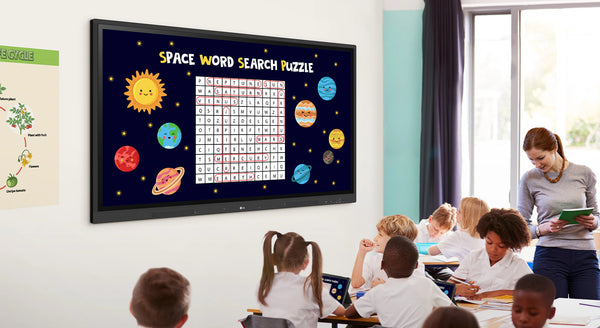
LG CreateBoard offers a variety of educational templates and teaching tools such as a ruler, table, and sticky notes, allowing for active engagement by students and enabling intuitive classes. Editing images and videos becomes easy with LG CreateBoard, and created resources can be easily shared with others through QR codes.
Multi-touch
LG CreateBoard can simultaneously detect up to 40 points for multi-touch functionality. This creates a lifelike board touch experience, helping students easily become accustomed and truly engage in classes. This leads to the maximum concentration and organic engagement of students.
Easy to Save / Import / Export
LG CreateBoard includes simple import and export functionality. Resources can be saved and imported directly to and from Google Drive or OneDrive, and files can be imported from a USB drive (Users can browse resources saved on USB storage).
Wireless ScreenShare
LG CreateBoard Share enables users to show up to 9 shared screens or a file on a screen in real-time when the LG CreateBoard Share app is installed on the device. Also, files from the host can be easily sent to any devices connected to the LG CreateBoard Share app, and several quick controls by the host are available.
LG ConnectedCare DMS
LG ConnectedCare DMS is a cloud solution for remotely monitoring, controlling, and managing the status of LG CreateBoard installed in educational environments. This feature enables IT managers to operate and manage important resources on operating devices without physically visiting sites.
Remote-control / Scheduling
Frequently used controls such as the power on/off, scheduling, brightness, and screen lock functions can be applied using a remote control
Broadcasting / Alert Messaging
Messages and a range of other content can be sent from the main system to individual classroom devices connected to LG ConnectedCare DMS. In case of urgent occasions such as a fire or a natural disaster, alert messages can be distributed manually across the system, which help teachers and students promptly take safety action.
Bluetooth Connectivity
LG CreateBoard supports wireless Bluetooth connections to various devices such as a speaker, mouse, keyboard, etc. This is optimal for building a hybrid environment so that online and offline classes can proceed smoothly.
C-type Connection
USB-C connectivity simplifies connections which enables charging and sending data simultaneously over just one single cable.
| Category | Details |
|---|---|
| PANEL | |
| Screen Size | 75" |
| Panel Technology | IPS |
| Back Light Type | Direct |
| Aspect Ratio | 16:9 |
| Native Resolution | 3840x2160 (UHD) |
| Refresh Rate | 60Hz |
| Brightness | 440nit (wo Glass, max), 390nit (wo Glass, typ), 400nit (w Glass, typ), 350nit (w Glass, typ) |
| Contrast Ratio | 1200:1 |
| Dynamic CR | 5000:1 |
| Colour gamut | NTSC 72% |
| Viewing Angle (H x V) | 178°(H/V) |
| Colour Depth | 10bit(8bit + FRC) |
| Response Time | 8ms |
| Surface Treatment | Haze 25% |
| Life time | 50,000hrs (L30) |
| Operation Hours | 16/7 |
| Portrait / Landscape | No / Yes |
| CONNECTIVITY | |
| RGB In | VGA |
| Audio In | Yes |
| Touch USB | 2 |
| RJ45(LAN) Out | Yes |
| HDMI IN | 3, HDCP2.2 |
| RS232C IN | Yes |
| RJ45(LAN) IN | Yes |
| USB IN | USB3.0 Type A (4), USB2.0 Type A(1), USB Type-C(1, USB-PD, DP-Alt,) |
| HDMI Out | Yes |
| Audio Out | 1, Optical 1(SPDIF) |
| MECHANICAL SPECIFICATION | |
| Bezel Colour | Black |
| Bezel Width | T/R/L/B : 15/15/15/44mm |
| Weight(Head) | 47.3Kg |
| Packed Weight | 60.6Kg |
| Monitor Dimension | 1709×1020×88mm |
| Carton Dimensions | 1863×1140×225mm |
| Handle | Yes |
| VESA™ Standard Mount Interface | 800×400mm |
| FEATURE - HARDWARE | |
| Internal Memory (eMMC) | 32GB |
| Wi-Fi/BT (Built-in) | Slot type |
| Auto Brightness Sensor | Yes |
| Power Indicator | Yes |
| FEATURE - SOFTWARE | |
| OS Ver. (webOS) | Android 11.0 |
| Booting Logo Image | Yes |
| PIP | 1 external source |
| PBP | 1 external source |
| Screen Share | LG CreateBoard Share |
| Smart Energy Saving | Energy Saving |
| ENVIRONMENT CONDITIONS | |
| Operation Temperature | 0 ~ 40 °C |
| Operation Humidity | 10 ~ 90 % RH |
| POWER | |
| Power Supply | 100-240V~ 50/60Hz 4.0A |
| Power Type | Built-In Power |
| POWER CONSUMPTION | |
| Typ. | 225 |
| Max. | 430 |
| BTU (British Thermal Unit) | 768 BTU/Hr(Typ.), 1467 BTU/Hr(Max) |
| DPM | ≤0.5W |
| Power off | ≤0.5W |
| CERTIFICATION | |
| Safety | CB / NRTL |
| EMC | FCC Class "A" / CE / KC |
| ErP / Energy Star | Yes / Yes |
| OPS COMPATIBILITY | |
| OPS Power Built-in | Yes |
| OPS Type Compatible | Yes (Slot) |
| SOFTWARE COMPATIBILITY | |
| Connected Care | Yes (DMS) |
| LANGUAGE | |
| OSD | English, Denmark, Finnish, German, Korean, Norwegian, Polski, Portugues(Europe), Portugues(Brazil), Romanian, Spanish, Swedish, Hungarian, Thai |
| ACCESSORY | |
| Basic | Power Cord 3 M1, USB Cable (Type A-Type B) 5 M1, HDMI Cable 3 M1, Writing Pen2pcs, User Manual, QSG, Carton Box, Remote Controller(include battery 2ea), Wifi module |
| Optional | Wall Mount(WM-L000S), Floor Stand(ST-000F) |
| DEDICATED FEATURE - TOUCH | |
| Available Object Size for Touch | Ø2 mm ↑ . |
| Accuracy (Typ.) | ±1mm |
| Interface | USB2.0 |
| Protection Glass Thickness | 3T(Anti-Glare) |
| Protection Glass Transmission | 88% |
| Operating System Support | Windows 7/8/10/Linux/Mac/Android(Linux/Mac Support one point touch) |
| Multi Touch Point | Max 40 points |
| Response Time ('Paint' app on Windows 10 PC) | ≤5ms |
| DEDICATED FEATURE - CREATE BOARD | |
| CPU | Quad core A55 |
| GPU | Mali G52MP2 |
| Memory(RAM) | 4GB |
| Storage | 32GB |
| Wi-Fi | 802.11a/b/g/n/ac/ax (WiFi 6) |
| LAN | Gigabit LAN |
| Bluetooth | Bluetooth 5.0 |
| Description | Downloads |
|---|---|
| LG 75TR3DK 75” 4K UHD Infrared Createboard Interactive Touchscreen Owner's Manual | Downloads |
Compare picture quality, touchscreen performance, software and connectivity with guidance from a commercial display specialist.
Access project pricing, volume discounts, product sourcing support and faster commercial quotations for your client projects.
Access education pricing, purchase-order support, installation services and account management for schools, academies, colleges, universities, NHS organisations, councils and government bodies.
Apply for a Screen Moove trade account and unlock exclusive pricing on commercial displays, digital signage, LED displays, mounting solutions and professional AV products.
Speak directly with Screen Moove about your display, digital signage, meeting-room or AV project.
Speak directly with a dedicated Screen Moove expert and get the right solution first time.
Simply complete our contact form, and we will promptly respond to your inquiries.
If you have any questions or enquiry, please fill out the form below with all of your details and we'll get back to you shortly.
Contact our team of experts today!