




Meeting Room Booking System Displays - Never Double-Book a Room Again
Stop wasted meeting time, room clashes and staff walking the office looking for a free space. ScreenMoove supplies and installs smart room booking panels that sit outside your meeting rooms and sync with Outlook, Google Calendar, Microsoft Teams and Zoom room workflows.
We focus on the physical room scheduling hardware, mounting, setup and installation, so your workplace gets a polished front-of-room booking experience rather than another software-only tool.

What is a meeting room booking system?
A meeting room booking system is a workplace scheduling setup that helps teams see whether a room is free, booked or about to become available. On this page, we are focusing on the physical room booking panel or room scheduling display that is mounted outside the meeting room door.
The panel connects to your existing calendar environment, such as Microsoft Outlook, Microsoft Teams, Google Calendar, Google Workspace or Zoom Rooms. Staff can check availability at the door, book the space, extend a meeting, release a room or see what is coming next without walking back to their desk.
This is different from general meeting room display and conference room AV. A meeting room display usually sits inside the room for video calls, presentations and collaboration. A room booking panel sits outside the room and manages availability.
- Wall-mounted room booking panels outside meeting rooms
- Calendar sync with Outlook, Google Calendar, Teams and Zoom
- Availability indicators for busy hybrid workplaces
- Professional installation, setup and support from ScreenMoove

Room booking panels make hybrid offices easier to run.
Hybrid working has changed how meeting rooms are used. Some rooms sit empty because nobody releases them. Others are double-booked because availability is unclear. A visible room scheduling display gives staff, visitors and facilities teams a simple way to see room status at the point of use.
Reduce Double-Bookings
Display live room availability outside every meeting room so employees can instantly see whether a space is free, occupied or reserved. This removes confusion, prevents accidental interruptions and helps keep busy offices running efficiently.
Logitech Tap Scheduler
The Logitech Tap Scheduler is purpose-built for room scheduling, providing a clean touch interface outside meeting rooms that integrates with Microsoft Teams, Zoom Rooms and leading workplace calendar platforms.
Professional Installation
ScreenMoove supplies, installs and configures room booking panels across the UK. Our engineers ensure every panel is mounted correctly, connected to your calendar environment and installed with discreet cable management for a professional finish.
Complete Meeting Room Solutions
Booking panels work best as part of a complete meeting room solution. ScreenMoove can combine scheduling displays with commercial displays, Microsoft Teams Rooms, Zoom Rooms, conferencing cameras, microphones, speakers and installation services to create a fully integrated workspace.

How the system works from installation to daily use.
A meeting room booking panel needs to be fitted in the right position, powered correctly and connected to your room calendar. ScreenMoove can support the hardware supply, mounting, cabling, setup guidance and wider meeting room fit-out.
Depending on the product and your IT environment, your panel can connect using PoE, network cabling or other approved power and data routes. Once installed, the panel is linked to the relevant room resource so the schedule shown on the door matches your internal calendar.
- Confirm room count, room names and calendar environment
- Specify panel type, size, mounting and power route
- Install panels outside each room with clean cable management
- Connect panels to Outlook, Google Calendar, Teams or Zoom workflows
- Support future rooms, replacements and meeting room upgrades
Room booking displays for offices, coworking spaces, education and healthcare.
Choosing the right room booking hardware.
The right product depends on your meeting platform, room design, IT preference, mounting route and whether you are upgrading the whole room or only adding a booking display outside the door.
| Buying factor | Yealink room panels | Logitech room scheduling | ScreenMoove advice |
|---|---|---|---|
| Best fit | Teams, Zoom and Yealink room ecosystems. | Modern Logitech meeting room environments and scheduling-focused projects. | Match the panel to your conferencing platform and existing hardware estate. |
| Room package | Works well when paired with Yealink interactive displays and Teams Rooms systems. | Works well with Logitech meeting room controllers and wider conferencing hardware. | Specify the panel alongside the in-room display, camera, audio and control setup. |
| Installation | Requires correct mounting, power, network and room account setup. | Requires correct mounting, power, network and room account setup. | Use installation support to avoid exposed cabling and rushed placement. |
| Scaling | Suitable for single rooms and multi-room office rollouts. | Suitable for single rooms and multi-room office rollouts. | Plan room naming, hardware consistency and future expansion early. |
One supplier for booking panels, meeting room displays, installation and support.
Buying a room booking panel is only part of the project. It needs to sit neatly outside the room, connect to the right calendar resource and work alongside your existing displays, video conferencing systems and IT policies.
Hardware advice
We help you compare Yealink, Logitech and small-format display options based on your platform and room requirements.
Installation route
Our installation services can support mounting, cable management, positioning and commissioning.
Complete room thinking
We can support room booking panels alongside displays, cameras, speakers, microphones and control hardware.
Single point of contact
Avoid splitting responsibility across a reseller, installer and IT supplier. ScreenMoove can guide the full route.
Meeting room booking panels and touch displays.
Browse room scheduling panels, touch controllers and small-format displays for meeting room booking systems, Microsoft Teams Rooms, Zoom Rooms and workplace scheduling setups.
 Logitech Tap Scheduler For meeting rooms | 952-000091 View product →
  Yealink RoomPanel For Microsoft Teams or Zoom View product →
  Samsung QB13R-M 13" small digital signage display View product →
  Yealink CTP25 Teams collaboration touch panel View product →
 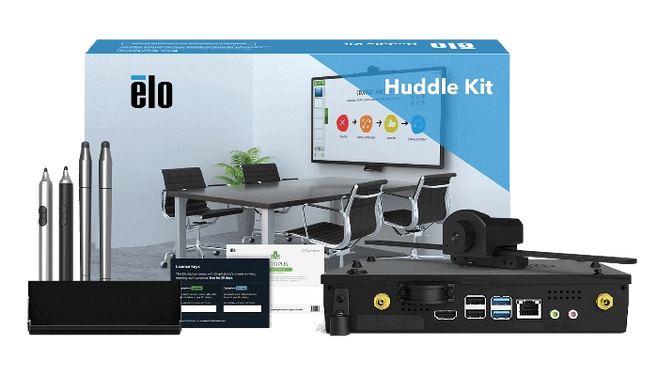 Elo Touch Huddle Kit Intel Core i5, 16GB RAM, 256GB SSD View product →
  Yealink RoomPanel Plus E2 10" Android room scheduling panel View product →
Meeting room booking system FAQs.
How much does a meeting room booking system cost?
A meeting room booking system can start from a few hundred pounds per panel, with final pricing depending on the product, room count, installation route, cabling, mounting and calendar setup requirements.
Do room booking panels work with Outlook and Google Calendar?
Yes. Many room booking panels are designed to sync with workplace calendar systems such as Microsoft Outlook, Microsoft Teams, Google Calendar, Google Workspace and Zoom room environments.
Can I install booking panels without replacing existing displays?
Yes. A room booking panel is usually installed outside the meeting room, so you can often add booking panels without replacing your existing in-room meeting display or conferencing setup.
What is the difference between Yealink and Logitech room booking hardware?
Yealink and Logitech both offer professional meeting room hardware, but the best option depends on your current meeting platform, preferred room ecosystem, IT setup, panel placement and whether the room is being upgraded as a full package.
Do you install meeting room booking panels nationwide?
Yes. ScreenMoove supports UK-wide meeting room display, room booking panel and commercial AV installation projects, including supply, mounting, cabling, setup guidance and aftercare.
Can ScreenMoove help with the full meeting room, not just the booking panel?
Yes. ScreenMoove can support the wider room package, including meeting room displays, Microsoft Teams Rooms systems, Zoom Rooms hardware, cameras, speakers, microphones, touch controllers and installation services.

Need a meeting room booking system?
Speak to ScreenMoove about room booking panels, scheduling displays, Yealink RoomPanel, Logitech Tap Scheduler, small meeting room displays and full meeting room installation packages.
- Room booking panels for offices, coworking and meeting spaces
- Yealink, Logitech and small-format display options
- Installation, mounting, cabling and setup support
- Support for Microsoft Teams, Zoom and calendar-led workflows
Request a Booking System Quote
Tell us how many rooms you need to manage and our team will recommend the right panel, display and installation route.


