Book a Free Product Demonstration
Compare picture quality, touchscreen performance, software and connectivity with guidance from a commercial display specialist.

32:9 SuperWide 49" screen with 5120 x 1440 resolution is designed to replace multiscreen setups for a massive wide view. It's like having two 27" 16:9 Quad HD displays side by side. SuperWide monitors offer the screen area of dual monitors without the complicated setup.

Gaming shouldn't be a choice between choppy gameplay or broken frames. Get fluid, artefact-free performance at virtually any frame rate with Adaptive-Sync technology, smooth quick refresh and ultra-fast response time.

This Philips display features a built-in USB type-C docking station with power delivery. Its slim, reversible USB-C connector allows for easy, one-cable docking. Keep it simple by connecting all your peripherals, like your keyboard, mouse and your RJ-45 Ethernet cable to the monitor's docking station. Simply connect your notebook to this monitor with a single USB-C cable to watch high-resolution video and transfer super-speed data while powering up and recharging your notebook at the same time.

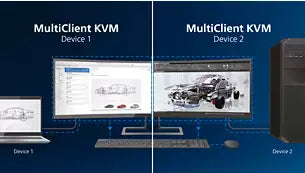
With the MultiClient Integrated KVM switch, you can control two separate PCs with one monitor-keyboard-mouse setup. A convenient button allows you to quickly switch between sources. Handy with setups that require dual PC computing power or sharing one large monitor to show two different PCs.

Philips' innovative and secure webcam pops up when you need it and securely tucks back into the monitor when you are not using it. The webcam is also equipped with advanced sensors for Windows Hello™ facial recognition, which conveniently logs you into your Windows devices in less than 2 seconds, 3 times faster than a password.

VESA-certified DisplayHDR 400 delivers a significant step up from normal SDR displays. Unlike, other "HDR-compatible" screens, true DisplayHDR 400 produces astonishing brightness, contrast and colours. With global dimming and peak brightness up to 400 nits, images come to life with notable highlights while featuring deeper, more nuanced blacks. It renders a fuller palette of rich new colours, delivering a visual experience that engages your senses.

With the ultra-high resolution Philips MultiView display, you can now experience a world of connectivity. MultiView enables active dual connect and view so that you can work with multiple devices like a PC and notebook simultaneously, for complex multitasking.

The Compact Ergo Base is a people-friendly Philips monitor base that tilts, swivels and height-adjusts so each user can position the monitor for maximum viewing comfort and efficiency.

Studies have shown that just as ultra-violet rays can cause eye damage, shortwave-length blue light rays from LED displays can cause eye damage and affect vision over time. Developed for wellbeing, the Philips LowBlue Mode setting uses a smart software technology to reduce harmful shortwave blue light.

Due to the way brightness is controlled on LED-backlit screens, some users experience flicker on their screen which causes eye fatigue. Philips Flicker-Free technology applies a new solution to regulate brightness and reduce flicker for more comfortable viewing.
Innovative curved display offers less image distortion, a wider field of view, reduced glare and more comfort for your eyes.
| Technical Specifications | |
|---|---|
| LCD panel type | VA LCD |
| Backlight type | W-LED system |
| Panel Size | 48.8"/124 cm |
| Display Screen Coating | Anti-Glare, 2H, Haze 25% |
| Effective viewing area | 1193.5 (H) x 335.7 (V) mm at 1800 R curvature* |
| Aspect ratio | 32:9 |
| Maximum resolution | 5120 x 1440 @ 70 Hz* |
| Pixel Density | 109 PPI |
| Response time (typical) | 5 ms (Grey to Grey)* |
| Brightness | 450 cd/m² |
| Contrast ratio (typical) | 3000:1 |
| SmartContrast | 80,000,000:1 |
| Pixel pitch | 0.233 x 0.233 mm |
| Viewing angle | 178º (H)/178º (V) |
| Flicker-free | Yes |
| Picture enhancement | SmartImage |
| Display colours | 16.7 M |
| Colour gamut (min.) | BT. 709 Coverage: 99.67%, DCI-P3 Coverage: 94.62% |
| Colour gamut (typical) | NTSC 103%, sRGB 121%, Adobe RGB 91%* |
| HDR | DisplayHDR 400 certified (DP/HDMI) |
| Scanning Frequency | 30–230 kHz (H)/48–70 Hz (V); Adaptive sync (for HDMI/DP) |
| SmartUniformity | 97 ~ 102% |
| Delta E | < 2 |
| sRGB | Yes |
| LowBlue Mode | Yes |
| EasyRead | Yes |
| Adaptive sync | Yes |
| Signal Input | DisplayPort 1.4* x 1, HDMI 2.0 b x 2, USB-C x 1 (upstream, power delivery up to 90 W) |
| HDCP | HDCP 1.4 (HDMI/DP/USB-C), HDCP 2.2 (HDMI/DP/USB-C) |
| USB Hub | USB 3.2 Gen 2, USB-B upstream x 1, USB-A downstream x 3 (with x 1 fast charge B.C 1.2) |
| HBR3 | HBR3 (USB-C) |
| Audio (In/Out) | Headphone out |
| RJ45 | Ethernet LAN up to 1 G*, Wake on LAN |
| Sync Input | Separate Sync |
| USB | USB-C |
| Built-in Speakers | 5 W x 2 |
| Built-in webcam | Pop-up 2.0 megapixel FHD camera with microphone and LED indictor (for Windows 10 Hello) |
| MultiView | PBP (2 x devices) |
| User convenience | SmartImage |
| Input | User |
| Menu | Power On/Off |
| Control software | SmartControl |
| OSD Languages | Brazil Portuguese, Czech, Dutch, English, Finnish, French, German, Greek, Hungarian, Italian, Japanese, Korean, Polish, Portuguese, Russian, Simplified Chinese, Spanish, Swedish, Traditional Chinese, Turkish, Ukrainian |
| Kensington lock | Yes |
| VESA mount (100 x 100 mm) | Yes |
| Plug and Play Compatibility | DDC/CI, Mac OS X, sRGB, Windows 10 / 8.1 / 8 / 7 |
| Height adjustment | 130 mm |
| Swivel | -/+ 20 degree |
| Tilt | -5~15 degree |
| ECO mode | 43.3 W (typ.) |
| On mode | 41.25 W (typ.) (EnergyStar test method) |
| Standby mode | 0.3 W (typ.) |
| Off mode | Zero watts with Zero switch |
| Energy Label Class | G |
| Power LED indicator | Operation - White; Standby mode - White (flashing) |
| Power supply | Built-in 100–240 VAC, 50–60 Hz |
| Product with stand (max height) | 1194 x 568 |
Compare picture quality, touchscreen performance, software and connectivity with guidance from a commercial display specialist.
Access project pricing, volume discounts, product sourcing support and faster commercial quotations for your client projects.
Access education pricing, purchase-order support, installation services and account management for schools, academies, colleges, universities, NHS organisations, councils and government bodies.
Apply for a Screen Moove trade account and unlock exclusive pricing on commercial displays, digital signage, LED displays, mounting solutions and professional AV products.
Speak directly with Screen Moove about your display, digital signage, meeting-room or AV project.
Speak directly with a dedicated Screen Moove expert and get the right solution first time.
Simply complete our contact form, and we will promptly respond to your inquiries.
If you have any questions or enquiry, please fill out the form below with all of your details and we'll get back to you shortly.
Contact our team of experts today!