


Blog post
Restaurant Menu Screens That Work Harder
A lunchtime queue is not the moment to discover that a price has changed, a meal deal has sold out or the handwritten specials board is difficult to read from the door. Restaurant menu screens put the information customers need where they can see it clearly, while giving operators far more control over what is promoted, when, and at which location.
For restaurants, cafés, pubs, quick-service venues and takeaways, a digital menu is not simply a replacement for print. It is a sales and operations tool. The right commercial display setup can make ordering easier, keep branding consistent and reduce the work involved in updating menus across a single venue or an entire estate.
What restaurant menu screens need to achieve
A good menu board must be readable first and attractive second. Customers often make decisions quickly, from several metres away and in variable lighting. If prices, product names and modifiers are unclear, a high-resolution screen will not solve the problem.
The most effective layouts use clear categories, generous spacing and a hierarchy that leads the eye from the main item to its price and any upgrade option. A busy restaurant may need menus separated by daypart, with breakfast content switching automatically to lunch and evening menus. A takeaway may prioritise bundles, delivery collection offers and the highest-margin add-ons.
Digital screens make these changes practical. Instead of replacing printed panels, a manager can schedule content centrally, apply a price update across selected sites and remove unavailable items promptly. This is particularly valuable where ingredient costs fluctuate or promotions change regularly.
There is, however, a balance to strike. Constant movement can distract from the ordering journey. Animation should support the menu, not compete with it. Use motion sparingly for featured items, limited-time offers or a clearly positioned promotional panel, while core menu content remains stable and easy to scan.
Choosing commercial restaurant menu screens
Consumer televisions can appear cost-effective at first, but they are rarely designed for the long daily operating hours, portrait installation, remote management and warranty requirements of a food service environment. Commercial displays are built for continuous or extended use and are available with specifications suited to customer-facing menu applications.
Screen size and viewing distance
Screen size should follow the physical space, counter layout and typical viewing distance. A compact café menu above a till may suit 32-inch or 43-inch displays. Larger quick-service counters, food halls and drive-through collection points often require 49-inch, 55-inch or larger screens to keep text legible at a distance.
More screens are not automatically better. Three well-designed displays can be easier to read than five overcrowded panels. Before purchasing, map the customer queue, identify the furthest likely viewing point and allow room for headings, product images and pricing without reducing type size too far.
Brightness and lighting conditions
Brightness is one of the most overlooked specifications. A standard indoor display may work well in a shaded dining area but look washed out behind a glazed shopfront or beneath strong ceiling lighting. For venues exposed to daylight, a high-brightness commercial display provides the contrast needed for menu content to remain visible.
If screens face outward to attract passing trade, the requirement changes again. Window-facing digital signage needs sufficient brightness to compete with daylight and should be selected with heat management and viewing angle in mind. The correct specification depends on the site, rather than a one-size-fits-all brightness figure.
Orientation, bezels and mounting
Landscape is the familiar choice for overhead menu boards because it mirrors the natural format of a printed menu. Portrait screens can be useful beside kiosks, at collection points or for promotional content where a taller layout suits the available wall space.
Professional mounting matters as much as the display. Ceiling mounts, wall mounts and menu-board rails must be appropriate for the screen weight, wall construction and required viewing angle. Cables and power supplies should be concealed where possible, while retaining practical access for maintenance. In a busy hospitality environment, a tidy installation protects the brand as well as the equipment.
Build content around buying decisions
The screen hardware creates the canvas; the content influences the order. Start by deciding what customers need to know immediately: menu category, hero products, prices, dietary information and collection instructions. Everything else should earn its space.
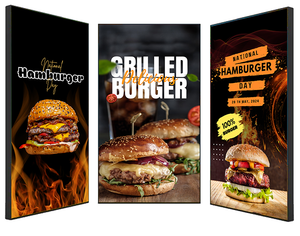
Food photography can increase appeal, but it needs to be professionally lit, consistent and used selectively. Filling every screen with large images often leaves too little room for menu detail. For many operators, one screen for promotional visuals and two or more structured menu screens is a more effective approach.
Place high-margin products and upgrades where customers naturally pause. This may be a premium meal deal near the top of the board, an extra-shot option beside hot drinks, or sides and drinks beside main meals. These prompts should be clear rather than pushy. The goal is to make a relevant choice easy, not make the menu feel crowded.
Allergen and dietary information needs careful handling. A menu screen can signpost vegetarian, vegan, halal or gluten-aware options, but it should not replace the venue’s approved allergen process. Ensure the content matches the information provided by the kitchen and is reviewed whenever recipes or suppliers change.
Software and players determine day-to-day control
A digital signage screen requires a way to receive and display content. In smaller venues, this might be a single commercial display with an integrated system-on-chip platform. Larger or multi-site operations often use dedicated media players and a cloud-based content management system.
The right approach depends on the network. Integrated players reduce hardware at each screen and can suit straightforward menu loops. Dedicated players can offer greater flexibility, processing power and standardisation across mixed display estates. Either way, the system should allow authorised users to update content remotely, schedule menus by time and location, and confirm that screens are online.
For operators with multiple branches, central control is a major advantage. Head office can publish a national campaign while local managers retain permission to amend branch-specific prices, availability or trading information. A well-configured CMS prevents the common problem of every site displaying a slightly different version of the menu.
Avoid choosing software on features alone. Consider who will create content, who can approve it, how quickly urgent updates can be made and what happens if internet connectivity drops. A reliable signage network should continue showing its last approved content if the connection is temporarily unavailable.
Plan the installation before ordering
Menu screen projects frequently become more expensive when power, data, mounting surfaces and cable routes are treated as an afterthought. A site survey should establish the display positions, available power points, network access, ambient light, ceiling height and safe installation method.
In older buildings, walls may require specialist fixings or a freestanding structure rather than a simple bracket. In shopping centres and transport-adjacent sites, work may need to take place outside trading hours and comply with landlord requirements. These details influence the equipment selection and programme.
It also pays to plan for service access. Screens installed tightly into a bulkhead can look excellent, but they still need ventilation and a practical route for replacing a player, cable or display should a fault occur. Commercial hardware is designed for demanding use, not immunity from wear.
Screen Moove supports complete digital menu board projects, from selecting commercial displays and mounts to software, installation and ongoing technical support. That combined approach is useful when a restaurant needs a reliable working system rather than a collection of separate components.
Measure performance after launch
Once the screens are live, review whether they are doing the job. Look at sales of promoted products, average transaction value, queue times, staff feedback and customer questions. If guests repeatedly ask where an item is or whether a deal applies, the layout may need refinement.
Test one change at a time where possible. A revised product image, a clearer bundle price or a better-positioned add-on can produce useful insight. Do not assume that the most visually dramatic design is the highest performing one. In food service, clarity and speed often win.
The best restaurant menu screens become part of everyday operations: accurate enough for staff to trust, clear enough for customers to order confidently, and flexible enough to respond when the menu changes before the next rush begins.


