-
4K UHD 3840 x 2160 resolution
20-point multi-touch capability & dual styluses
Built-in Android OS 9.0 platform
Multi-touch plug and play for Windows/Android/Linux/Chrome/macOS
A USB-C port for digital signal, data and 65W power delivery
4K UHD RESOLUTION WITH ANTI-GLARE TREATMENT
Meetboard 3 interactive display delivers visual content with 4K UHD clarity and a special anti-glare coating for improved eye comfort. The embedded EcoSmart Sensor auto-adjusts the display’s backlight brightness to match indoor light conditions.

20-POINT MULTI-TOUCH & DUAL PENS
Using fingers or double-headed touch pens, multiple participants can simultaneously draw and annotate on the 20-point touch-enabled screen. This makes mind-mapping and brainstorming as intuitive as using a whiteboard.
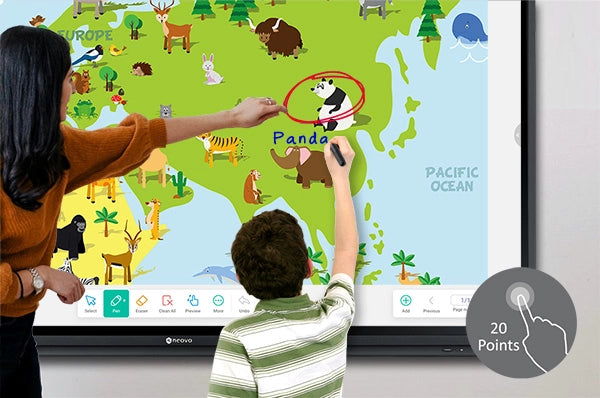
INTUITIVE USER INTERFACE WITH EASY-TO-USE TOOLS
Meetboard’s fresh new interface and simplified icons are user-friendly and intuitive. Essential apps and helpful tools such as Browser, WPS Office, ScreenLock and Timer, are preloaded to aid productivity in meeting and classroom settings.

INTELLIGENT DIGITAL WHITEBOARD APP
Writing on Meetboard Whiteboard App is natural and user-friendly, with various brush colors or thicknesses. The Smart Detection tool can recommend a drawing, while tools like “Table” and “Sticky-Notes” keep discussions organized.

POWERFUL USB-C CONNECTIVITY
A USB-C cable connection facilitates teaching and team collaboration. Connect your PC or laptop to Meetboard 3 via a USB-C cable to quickly transfer data and video/audio signals, access touch functions and up to 65W power charging, using the peripherals on Meetboard 3.
Blog: How to Connect Other Devices on Meetboard 3 Interactive Displays?
Disclaimer: When charging a connected device via a USB Type-C connector, check if the device is equipped with a USB Type-C Connector that supports the charging function via USB Power Delivery.

INTEGRATED FILE MANAGEMENT FOR SIMPLIFIED COLLABORATION
Meetboard Finder, a file management app, allows you to easily access, save, and share files via USB drive, Cloud storage, Samba service, and FTP portal shortcuts.

SPLIT SCREEN FOR ENHANCED MULTI-TASKING
Select multi-window mode to utilize different apps simultaneously. Dragging items from one window to another, Meetboard 3 allows you to multi-task efficiently, speeding up collaborations.

WIRELESS SCREEN MIRRORING AND CONTROL
Meetboard 3 supports AirPlay, Miracast, and Chromecast wireless mirroring technology and embeds a powerful screen-sharing app. Wirelessly present, share multi-media content, interact with and control Meetboard or multiple Meetboards from iOS or Android devices in real-time on-site or remotely.

VIDEO CONFERENCING READY
Meetboard 3 can easily be adapted for video conferencing by connecting an all-in-one webcam* via a USB cable. Compatible with mainstream video conferencing apps*, such as Zoom, Google Meet, Teams, Webex, and GoToMeeting, this facilitates remote or hybrid collaborations.

ADVANCED MOBILITY
AG Neovo’s FMC-06 floor mounting cart offers advanced mobility to fulfil the needs of on-site and virtual collaborations in a changing world. Installing Meetboard 3 on FMC-06 requires minimal effort and brings all your accessories together. Lockable casters keep the display secure and in place once in position.

-
|
| Panel |
|
| Panel Type |
IPS |
| Panel Size |
64.5" |
| Max. Resolution |
UHD 3840 x 2160 |
| Pixel Pitch |
0.373 mm |
| Brightness |
400 cd/m² |
| Viewing Angle (H/V) |
178°/178° |
| Display Colour |
1.07B |
| Response Time |
5 ms |
| Surface Treatment |
Haze 25% 3H Anti-glare treatment |
| Frequency |
|
| Frequency (H) |
30 kHz-80 kHz |
| Frequency (V) |
50 Hz-76 Hz |
| Signal Input |
|
| HDMI |
2.0 x 3 |
| VGA |
15-Pin D-Sub x 1 |
| Signal Output |
|
| HDMI |
2.0 x 1 |
| External Control |
|
| RS232 In |
9-Pin D-Sub |
| LAN |
RJ45 x 2 |
| Embedded Player |
|
| OS |
Android 9.0 |
| CPU |
Quad core A73 |
| Memory |
4G |
| Storage |
32G |
| Other Connectivity |
|
| USB |
2.0 x 1 / 3.0 x 4 / Type-C (DP 1.4 / Data 3.0 / PD:65W) |
| Audio |
|
| Audio In |
Stereo Audio Jack (3.5 mm) |
| Audio Out |
S/PDIF Stereo Audio Jack (3.5 mm) |
| Internal Speakers |
16W x 2 |
| Touch Screen |
|
| Technology |
Infrared Touch Frame |
| Positional Accuracy |
±1.0 mm |
| Panel Interface |
USB 2.0 x 2 (Type-B) |
| Single Touch Plug & Play |
Windows 2000/XP/Vista/CE 6.0 macOS |
| Multi-touch Plug & Play |
Windows 7/8/10/11 Android/Linux (kernel version 3.5+) Chrome OS (39 or above) |
| Multi-touch Support by Driver |
macOS (supported by UPDD driver) |
| Power |
|
| Power Supply |
Internal |
| Power Requirements |
AC 100-240V 50/60 Hz |
| On Mode |
175W |
| Off Mode |
< 0.5W |
| Accessories |
Supplied |
| Power Cord |
-
AG Neovo provides the following limited warranty. This limited warranty applies only to the original End User and to no other purchaser or transferee.
FOR LCD DISPLAYS
AG Neovo warrants its LCD Monitor products and parts against defects in materials and workmanship under normal use for a period of Three (3) Years for parts from the date of initial retail purchase. AG Neovo warrants LCD Panel for a period of Three (3) years from the date of initial retail purchase. During this period, AG Neovo will repair or replace a defective product or part without charge.
Changes to or updates of the following warranty conditions and procedures can be found at the AG Neovo website or may be obtained from AG Neovo by contacting your local AG Neovo office.
WHAT THE WARRANTY COVERS
The AG Neovo warranty obligations for the product are limited to the terms set forth below.
- AG Neovo warrants the product against defects in materials for a period of three (3) years for all series of TFT LCD panel and three (3) years for parts.
- With respect to LCD display pixel quality inspection of the defective display pixels must be performed in black screen. A maximum of 3 bright pixels or 3 dark pixels is allowed in an LCD panel; the total number of dark and bright pixels should not exceed 3 pixels for the whole area.
- If a defect arises within the warranty period, please contact the AG Neovo service centre; you should provide your products serial number, and your contact information, such as address, and phone number.
- AG Neovo warrants replacement products or parts provided under this warranty against defects in materials and workmanship from the date of the replacement or repair for ninety (90) days or for the remaining portion of the original product’s warranty, whichever provides longer coverage.
WHAT THE WARRANTY DOES NOT COVER
- Products on which the serial number has been defaced, modified or removed;
- Products, which are not accompanied by a copy of the original invoice or where information on the original invoice has been altered or erased in any manner whatsoever.
- Damage, deterioration or malfunction resulting from:
- Accident, abuse, misuse, neglect, fire, water/liquids, lightning, or other acts of nature, unauthorised product modification, or failure to follow instructions supplied with the Products.
- Repair or attempted repair by anyone not authorised by AG Neovo.
- Any damage of the Products due to shipment.
- Removal or installation of the Products.
- External causes to the Products, such as electric power fluctuations or failure.
- Use of supplies or parts not meeting the specifications of AG Neovo.
- Normal wears and tear.
- Any other cause, which does not relate to a Product defect.
- Damage to, or abuse of, the coating on the surface of the display.
- Scratched or broken panel.
- Cracked Printed Circuit Board or abused housing and/or base.
- Exposure to an excessive dusty and/or humid environment.
- Because LCD panel is the liquid characteristic, damage caused by static (non-moving) images displayed for lengthy periods of time (also referred to as “burn-in”).
AG Neovo has the right to revise the policy.
Please contact local AG Neovo office to get detailed information.
FOR ACCESSORIES
AG Neovo warrants its accessories to be free from defects in material and workmanship under normal operating conditions for a period of 12 months limited warranty.
Changes to or updates of the following warranty conditions and procedures can be found at the AG Neovo website or may be obtained from AG Neovo by contacting your local AG Neovo office.
WARRANTY CONDITIONS
- The warranty applies only to products distributed by AG Neovo.
- The warranty applies only to defects in material or workmanship as limited above and does not include normal wear items. The warranty applies only to defects which occur during normal use and does not extend to damage to products or parts which results from alterations, repairs, modifications, faulty installation or service by anyone other than an authorised AG Neovo Service Centre; damage to products or parts caused by accident, abuse, misuse, maintenance, mishandling, misapplication, or use in violation of instructions furnished by us; damage which occurs in shipment or any damage caused by an act of God, such as lightning or line surges.
- You must retain your bill of sale, invoice or receipt.
- Any replacement parts provided to the purchaser in fulfillment of this warranty does not extend the warranty period only the residual portion of the original warranty period remains.
AG Neovo has the right to revise the policy.
Please contact local AG Neovo office to get detailed information.
For information on obtaining warranty service, call your AG Neovo dealer, AG Neovo’s Customer Support hotline, or email service centers.






