Book a Free Product Demonstration
Compare picture quality, touchscreen performance, software and connectivity with guidance from a commercial display specialist.
50" 4K UHD Professional Digital Signage 24/7 display (Landscape and Portrait) featuring Android OS, FailOver and Intel® SDM slot
The ideal all-in-one solution for environments where performance and reliability are mission-critical. The iiyama ProLite LH5052UHS is a 500cd/m² high brightness professional large format display with a 24/7 operating time. On-board Android 8.0 OS means you can easily customize the display to your needs and install applications directly to it. The embedded option of Nsign* empowers you to create and schedule a range of content across multiple screens using a powerful cloud-based solution. The Intel® SDM Slot provides an embedded PC option for total flexibility, security and control, while the FailOver feature ensures your content is always actively displayed through your choice of inputs.
You can also order a wall mounting bracket or ceiling bracket to mount your display in your store.
*Nsign license required – please see our nsign landing page for more information
Introducing the iiyama ProLite LH5052UHS-B1: A cutting-edge 50-inch 4K UHD professional digital signage display, specifically engineered for continuous 24/7 operation in the most demanding environments. With its sleek, thin bezel design and matte finish, this display is the perfect solution for businesses that require performance, reliability, and versatility.
Equipped with an advanced VA panel, the ProLite LH5052UHS-B1 delivers superior 3840x2160 resolution with 1.07 billion colors, ensuring crisp, vivid images with a remarkable static contrast ratio of 4000:1. The wide viewing angles of 178° ensure excellent visibility from all perspectives, making it ideal for both landscape and portrait orientations.
Harness the power of Android 8.0 OS, enabling seamless customization and the ability to install a variety of applications directly onto the display. Take advantage of Nsign* for an all-in-one content management and scheduling solution across multiple screens, powered by a robust cloud-based platform.

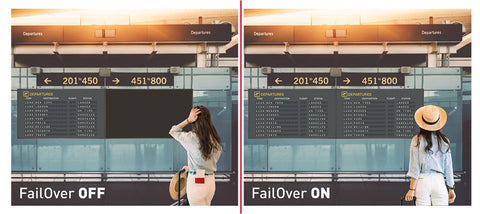
FailOver is a feature which automatically detects input sources. When there is no signal on the default input it will automatically switch to the next available input. FailOver allows customers to prioritize a number of inputs (incl. Browser, Media Player and Custom) and ensures your content is always actively displayed, assuring active content at all times.

UHD resolution (3840x2160), better known as 4K, offers a gigantic viewable area with 4 times more information and work space than a Full HD screen. Due to the high DPI (dots per inch), it displays an incredibly sharp and crisp image.

Thanks to Android OS, you can easily customize the display to your needs by installing applications directly.

A Smart Display Module (Small/Large) is a plug-in module which can easily be inserted into the most stylish and ultra-slim displays. This small-sized module delivers great performance with minimum implementation and management. Available as optional

VA panel technology offers higher contrast, darker blacks and much better viewing angles than standard TN technology. The screen will look good no matter what angle you look at it.
| Design | Thin bezel |
| Diagonal | 49.5", 125.7cm |
| Panel | VA, matte finish, haze 28% |
| Native resolution | 3840 x 2160 @60Hz (8.3 MegaPixels 4K UHD) |
| Aspect ratio | 16:9 |
| Panel brightness | 500 cd/m² |
| Static contrast | 4000:1 |
| Response time (GTG) | 8ms |
| Viewing zone | horizontal/vertical: 178°/178°, right/left: 89°/89°, up/down: 89°/89° |
| Colour support | 1.07B 8bit+FRC |
| Horizontal Sync | 30 - 80kHz |
| Viewable area W x H | 1095.84 x 616.41mm, 43.1 x 24.3" |
| Bezel width (sides, top, bottom) | 14.9mm, 14.9mm, 14.9mm |
| Pixel pitch | 0.285mm |
| Bezel colour and finish | black, matte |
| Analog signal input | VGA x1 (DVI-I: VGA+DVI) |
| Digital signal input | DVI x1 (max. 1920x1080 @60Hz) HDMI x3 (v.2.0, max. 3840x2160 @60Hz) DisplayPort x1 (v.1.4, max. 3840x2160 @60Hz) |
| Audio input | Mini jack x1 (3.5mm) |
| Monitor control input | RS-232c x1 RJ45 (LAN) x1 IR x1 (3.5mm stereo mini) |
| Digital signal output | DisplayPort x1 (max. 3840x2160 @60Hz, MST-out Daisy Chain v.1.2) |
| Audio output | Speakers 2 x 10W |
| Monitor control output | RS-232c x1 IR loop through x1 (3.5mm stereo mini) |
| HDCP | v.2.2 |
| USB ports | x2 (v.2.0) |
| Integrated software | Android OS 8.0, EShare, iiSignage |
| WiFi | optional |
| Hardware | CPU: MTK96B+MSB6000, CA73*2+A53*2, Memory: 3GB DDR4, Storage: 32GB eMMC |
| Extra | Intel® SDM-L, micro SD card slot |
| Max. non-stop operating time | 24/7 |
| Anti image retention | yes |
| Media playback | yes |
| Housing (bezel) | metal (front) |
| OSD languages | EN, DE, FR, ES, IT, CN, RU, JP, CZ, NL, PL |
| Control buttons | Power, Mute, Input, Plus, Minus, Up, Down, Menu |
| User controls | picture (brightness, contrast, sharpness, black level, tint, color, noise reduction, gamma selection, color temperature, color control, smart power, over scan, picture reset), screen (H. position, V. position, clock, clock phase, zoom mode, custom zoom, auto adjust, screen reset), Audio (balance, treble, bass, volume, audio out, maximum volume, minimum volume, mute, audio source, audio reset, audio out sync, speaker setting), configuration 1 (switch on state, panel saving, RS232-routing, boot on source, WOL, configuration 1 reset, factory reset), Configuration 2 (OSD turn off, OSD H-Position, OSD V-position, rotation, information OSD, logo, monitor ID, heat status, monitor information, DP version, HDMI version, configuration 2 reset), advanced option (IR control, power LED light, keyboard control, tiling, off timer, schedule, HDMI with one wire, HDMI with one wire power off, FailOver, language, OSD transparency, power save, SDM settings, advanced option reset), Android settings (network, signage display, apps, display, security, date & time, developer options, about) |

| Plug&Play | DDC2B |
| Orientation | landscape, portrait |
| Fanless design | yes |
| VESA mounting | 400 x 400mm |
| Operation temperature range | 0°C - 40°C |
| Storage temperature range | - 20°C - 60°C |
| MTBF | 50.000 hours (excluding backlight) |
| Cables | power, HDMI, RS-232c |
| Guides | quick start guide, safety guide |
| Other | Stickers for screw holes |
| Remote control | yes (batteries included) |
| Power supply unit | internal |
| Power supply | AC 100 - 240V, 50/60Hz |
| Power usage | 147W typical, 0.5W stand by, 0.5W off mode |
| Regulations | CB, CE, TÜV-Bauart, EAC, RoHS support, ErP, WEEE, REACH |
| Energy efficiency class (Regulation (EU) 2017/1369) | G |
| Product dimensions W x H x D | 1128.4 x 649 x 63.5mm |
| Box dimensions W x H x D | 1230 x 142 x 800mm |
| Pallet volume | 16pcs |
| Weight (without box) | 14.8kg |
| Weight (with box) | 18.5kg |
| EAN code | 4948570118489 |
| Warranty | Product | Cover |
| Visioncare | Desktop LCD products (Monitors) (17" - 43") |
3 years on-site UK warranty. (Upgrades to 5 years available) |
| Touchcare |
LCD touchscreen products | 3 years repair and return. (Upgrades to on-site & 5 years available) |
| LFD | Large Format Displays Standard Warranty |
3 years collect and return (Upgrade to swap, installation & 5 years available) Download |
HOW TO ACTIVATE YOUR WARRANTY
There is no need to pre-register your warranty, just follow the six simple steps below to activate your warranty should the need arise. First-class service is assured by our experienced engineers and customer service helpdesk.
Step one - Check that all connections have been properly made.
Step two - Check the set-up in the user manual. Wherever possible, please try to check your iiyama product with alternate equipment before contacting the iiyama customer service help desk.
Step three - If the fault cannot be cured by the above means, call the iiyama customer service helpdesk on 01926 819 189. Please have ready to hand the following details: model number, serial number and date of purchase*. Or fill in the Service Request Form.
Step four - Your fault will be registered and you will be issued with a returns number, which you must quote on all paperwork relating to the defective unit.
Step five - Please retain any of your leads and manuals. Replacement/returned units will not include these sundry items.
Step six - Please ensure your product is clean and presentable before packaging it in the original box for collection.
* Proof of purchase may be required
ON-SITE SWAP OUT
PIONEERING CUSTOMER SERVICE.
iiyama has always strived to achieve maximum reliability and to prove our belief in our products we were the first manufacturer to confidently guarantee our display products with a 3-year on-site warranty as standard changing and shaping the warranty landscape forever.
Visioncare is our comprehensive warranty support scheme for standard desktop display products. We understand that should a fault occur, downtime needs to be minimised and vision care was designed to do just that.
1-) If your display should develop a fault within the first 2 years of purchase, iiyama will arrange a replacement unit of an equivalent or higher specification.
2-) iiyama endeavours to dispatch the replacement unit within 24hrs whenever possible.
3-) iiyama takes care of the swap out and all carraige charges.
And it's not just us at iiyama that believes we provide great service, our customers think so too. iiyama has been proud to receive many reader-voted magazine awards for customer satisfaction and reliability.
For Desktop and Touchscreen displays (below 42") service
Call 01926 819189 between 9:00am - 5:30pm Monday to Friday
For Large Format Displays (42" and above) service
Call 03302 020 463 between 9:00am - 5:30pm Monday to Friday
Compare picture quality, touchscreen performance, software and connectivity with guidance from a commercial display specialist.
Access project pricing, volume discounts, product sourcing support and faster commercial quotations for your client projects.
Access education pricing, purchase-order support, installation services and account management for schools, academies, colleges, universities, NHS organisations, councils and government bodies.
Apply for a Screen Moove trade account and unlock exclusive pricing on commercial displays, digital signage, LED displays, mounting solutions and professional AV products.
Speak directly with Screen Moove about your display, digital signage, meeting-room or AV project.
Speak directly with a dedicated Screen Moove expert and get the right solution first time.
Simply complete our contact form, and we will promptly respond to your inquiries.
If you have any questions or enquiry, please fill out the form below with all of your details and we'll get back to you shortly.
Contact our team of experts today!