


Blog post
Window Displays That Bring More Shoppers Inside
A shop window has only a few seconds to earn attention. On a busy high street, retail park or shopping centre, passers-by are filtering dozens of visual messages before they even reach your door. Effective window displays give retailers a flexible way to cut through that noise, promote timely offers and turn passing footfall into measurable store visits.
Unlike printed posters, commercial digital displays can change with the trading day. A café can promote breakfast at 8am, lunch deals at midday and takeaway offers in the evening. A fashion retailer can move from a new-season campaign to a sale message without replacing graphics in every branch. The result is a more responsive storefront, provided the screen, installation and content are specified correctly.
Why digital window displays perform differently
A window-facing display is not simply a standard television placed behind glass. It operates in a difficult environment: strong ambient light, reflections, changing daylight, limited ventilation and long daily operating hours all affect performance.
The commercial advantage is visibility and relevance. A well-positioned screen can show motion, product imagery, prices, short video and live promotional messages in a format that is far harder to ignore than static print. It also reduces the operational burden of producing, fitting and disposing of posters each time an offer changes.
For multi-site businesses, the value is greater still. Central teams can schedule approved campaigns across locations while allowing local managers to display branch-specific messages, such as event promotions, stock availability or revised opening times. That balance needs the right digital signage software and a dependable network connection, but it gives brands far more control over customer-facing communications.
There is a trade-off. Digital content should not become visual clutter. If a storefront already has heavy graphics, merchandise and pricing stickers, adding a bright display with fast-moving video can make the window harder to read. The strongest installations give each element a clear job: the screen attracts attention, the message explains the offer and the entrance makes the next action obvious.
Choosing commercial window displays for the site
Brightness is the first technical decision. Indoor commercial displays commonly provide around 500 to 700 nits, which can work in shaded windows or locations set back from direct daylight. For most street-facing applications, high-brightness displays of 2,500 nits or more are the practical starting point. In very bright, south-facing or sun-exposed positions, higher brightness may be required to keep text, prices and imagery legible.
More brightness is not automatically better. It brings higher power use and heat output, so the display enclosure, mounting position and ventilation must be considered together. A survey should assess when sunlight reaches the glass, not just how the window looks on a cloudy morning. Reflections from opposite buildings, street furniture and internal lighting can all reduce readability.
Commercial-grade hardware is designed for extended operation, often 16/7 or 24/7, with panels, cooling and warranty cover intended for business use. A domestic TV may appear cheaper at the point of purchase, but it is rarely engineered for sustained brightness, portrait mounting or the thermal conditions created in a shop window. Replacing failed consumer hardware can quickly erase the initial saving.
Screen size should match the viewing distance and the width of the window. A compact 43-inch display may suit a narrow salon window or a promotional point near the entrance. Larger 55-inch, 65-inch and 75-inch screens deliver more impact in wide retail frontages, showrooms and leisure venues. Two displays can be more effective than one oversized unit where the frontage has separate pedestrian approaches.
Portrait, landscape or double-sided?
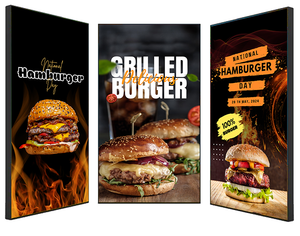
Portrait displays work well for fashion imagery, vertical video, property listings and campaign creative designed around a single product. Landscape screens are often the better choice for menu-led content, automotive promotions and wider video assets. The deciding factor is not preference alone: use the orientation that supports the message hierarchy and the available window space.
Hanging double-sided displays are useful where customers approach from both outside and inside the premises, such as shopping centres, stations, hospitality venues and entrance areas. They provide visibility in both directions while keeping floor space clear. Freestanding digital totems can be effective near a doorway, but they need careful placement so they do not obstruct access or create a safety issue.
Content that earns a second look
A high-brightness screen cannot rescue unclear content. The message must be understandable from the pavement, often while someone is walking past. Start with one commercial objective: bring customers in for a limited offer, introduce a new product range, reduce queue pressure by directing customers to self-service, or increase awareness of a service.
Keep the main proposition large, short and visible for long enough to read. A screen full of small text may look informative from inside the shop but will fail at street distance. Price-led messages need a prominent price, a product image and a simple call to action. Brand campaigns can use more visual storytelling, but should still show the brand and offer early in the sequence.
Motion should support the message rather than distract from it. Gentle transitions, product close-ups and short loops generally outperform frantic animations. Avoid relying on audio: street noise, local restrictions and customer expectations mean many window displays must communicate perfectly without sound.
Retailers should also plan content around the daypart. A bakery can lead with coffee and breakfast early on, then switch to sandwiches and afternoon treats. A gym can promote membership before work, classes in the evening and quieter sessions during the day. Seasonal creative matters, but practical information such as opening hours, click-and-collect availability or event notices can be equally valuable.
Installation details that protect performance
The screen position should be designed before hardware is ordered. Placing a display directly against glass can create heat build-up and make reflections more severe. A professional installation allows suitable clearance, secure commercial mounting and a neat route for power and data cables. It also keeps equipment protected from accidental knocks, customer interference and unauthorised access.
Consider the view from both sides of the glass. The display needs to face the pedestrian route, not simply sit square to the interior wall. In some windows, a slight angle improves sightlines considerably. Equally, the display should not block high-value merchandise or leave the shop looking closed off after dark.
Power, connectivity and player location should be agreed at the design stage. A media player may sit behind the display, within a secure cabinet or in a nearby comms area. Wired connectivity is usually the preferred option for permanent installations, although reliable business Wi-Fi can work where cabling is impractical. For critical campaigns across multiple sites, remote monitoring is useful because faults can be identified before a local team notices a blank screen.
Planning and landlord requirements can apply, particularly for externally mounted screens, illuminated signage and installations in managed retail destinations. Internal, window-facing displays are often simpler, but decision-makers should still check centre rules, lease conditions and local restrictions before committing to a design.
Managing window displays across one site or many
A single screen can run from a basic plug-and-play media player, but managed digital signage becomes more valuable as content changes more frequently or screen numbers increase. A content management system lets authorised users schedule campaigns, apply templates, create playlists and update displays remotely.
The right setup depends on who will manage it. A small independent retailer may want an easy system that allows a manager to update offers in minutes. A national operator may need user permissions, approval workflows, reporting and centrally controlled campaigns with local variations. In either case, templates protect brand standards and prevent stretched images, unreadable text or inconsistent pricing.
Screen Moove can support this process with commercial display supply, signage software, installation and technical guidance, helping businesses specify a solution that fits the location rather than forcing a generic screen into a demanding window environment.
Measure the commercial result
The most useful window display is one connected to a clear business outcome. Track changes in footfall, promotion redemptions, sales of featured products or visits during a campaign period. If the message includes a QR code, use a simple landing page or unique offer code to gauge engagement, but make sure the code is large enough to scan from a realistic stopping distance.
Test one variable at a time where possible. Compare a price-led message with a lifestyle-led creative treatment, alter the dwell time, or run different calls to action by time of day. The aim is not to fill the screen with more content. It is to identify the few messages that make people pause, enter and buy.
Treat the window as a live sales channel, not a place to park a screen. When the display is bright enough for the site, the content is direct and the system is easy to manage, it can keep working long after the printed poster would have become part of the background.


